
Customer Sessions
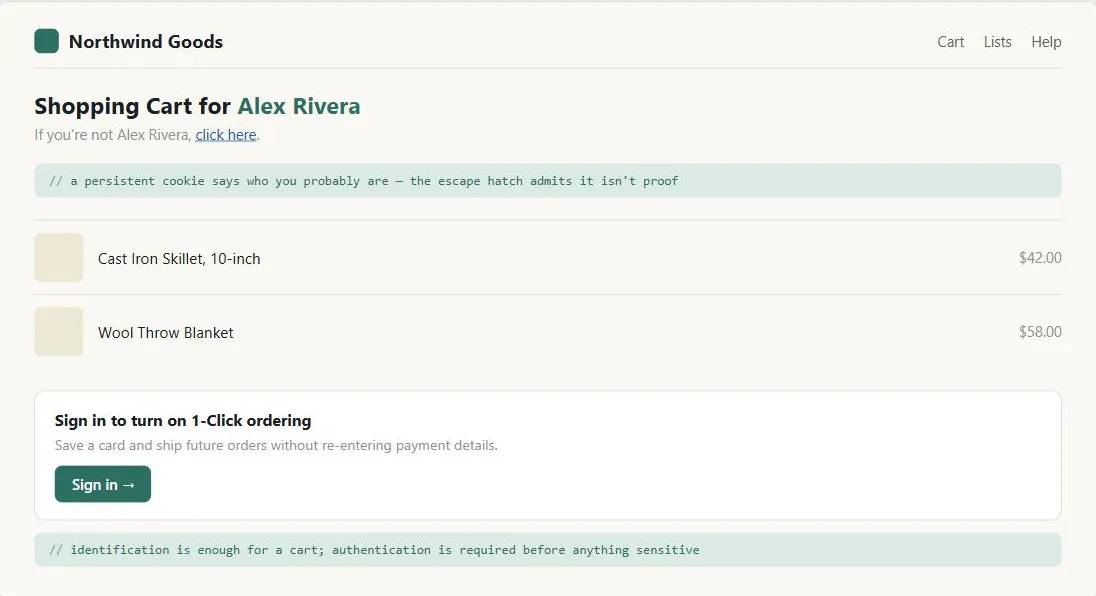 The page never had to ask Alex Rivera to prove anything to get this far — it only had to ask before it would remember a credit card for them.
Problem
HTTP was designed stateless — a Web server has no inherent memory of who is requesting a page or what they’ve already seen. Without a way to bridge that gap, a site can’t maintain a process funnel, a shopping cart, personalized content, or a paid subscription across multiple page loads; every customer would have to re-identify themselves on every page.
HTTP was designed stateless — a Web server has no inherent memory of who is requesting a page or what they’ve already seen.
Solution
Bridge the gap with a customer session — a temporary or persistent identifier that lets the server recognize the same customer across multiple requests.
Choose between temporary and persistent sessions
- Temporary sessions, for short-lived state. Last only until the browser closes. Implemented either as a session ID embedded in the URL, or a session cookie — functionally near-equivalent, differing mainly in where the identifier travels (URL vs. HTTP headers). Use these for what’s currently in a shopping cart, which step of a checkout a customer is on, or a temporarily-selected language for the current visit. Guest accounts are the one pattern that specifically requires a temporary rather than persistent session.
- Persistent sessions, for anything the site must remember across visits. Last across visits, implemented with a persistent cookie stored on the customer’s device. Use these when the site needs to remember something permanently: a returning customer’s identity, personalized recommendations, order history, or a saved locale/currency preference (see Internationalization). As a rule of thumb, any flow that goes through sign-in needs persistent sessions.
The tradeoff between the two is complexity vs. privacy: temporary sessions are simpler to implement (nothing has to be durably stored) and inherently better for privacy, since most of what they hold is discarded when the browser closes. Persistent sessions require a backing database and retrieval on every visit, but enable the streamlined, remembered experience customers expect from a personalized site.
The tradeoff between the two is complexity vs. privacy: temporary sessions are simpler to implement (nothing has to be durably stored) and inherently better for privacy, since most of what they hold is discarded when the browser closes.
Take extra care in government and privacy-sensitive contexts
Because of the heightened privacy expectations on public-sector sites, a self-service government site should avoid using cookies at all unless it gives clear notice of their use, has a compelling need for the data, has publicly disclosed safeguards, and has explicit organizational sign-off. Where a government site does need sessions, session cookies raise fewer concerns than persistent cookies and are the safer default.
Heed two security warnings
- Never place sensitive data in a session identifier. A session ID embedded in a URL (
?user=jhong&password=xyzzyz) is visible to anyone who glances at the address bar, and it ends up in server logs, browser history, and anywhere the URL gets copied or shared. - Don’t assume cookies are secure by default. A badly-designed site lets an attacker capture a customer’s cookie in transit and impersonate them. The underlying fix is understanding that identification (a username, a cookie — stating who someone is) and authentication (a password — proving it) are different problems. Use cookies to streamline identification, but don’t rely on them for authentication unless there’s genuinely nothing sensitive at stake. Where sensitive information is involved, split the site into secure pages (behind authentication, over an encrypted connection) and non-secure pages (freely browsable) — e.g. a shopping cart is fine unauthenticated, but checkout should require sign-in and a secure connection. See Trust and Credibility for the secure-connection signaling side of this.
The underlying fix is understanding that identification (a username, a cookie — stating who someone is) and authentication (a password — proving it) are different problems.
Related Concepts
Patterns
- Sign-In and Account Creation
- Account Management
- Process Funnel
- Privacy Policy
- Privacy Preferences
- Internationalization
- Personalized Recommendations
- Self-Service Government
- Personalized Content
- Shopping Cart
Principles
Standards
Sources
The Design of Sites: Pattern Group H — Helping Customers Complete Tasks (Pattern H5) is this page’s source — the temporary-vs-persistent session distinction, the cookie/session-ID mechanics, the self-service-government cookie caution, and the identification-vs-authentication security distinction.