
Search Engine Optimization
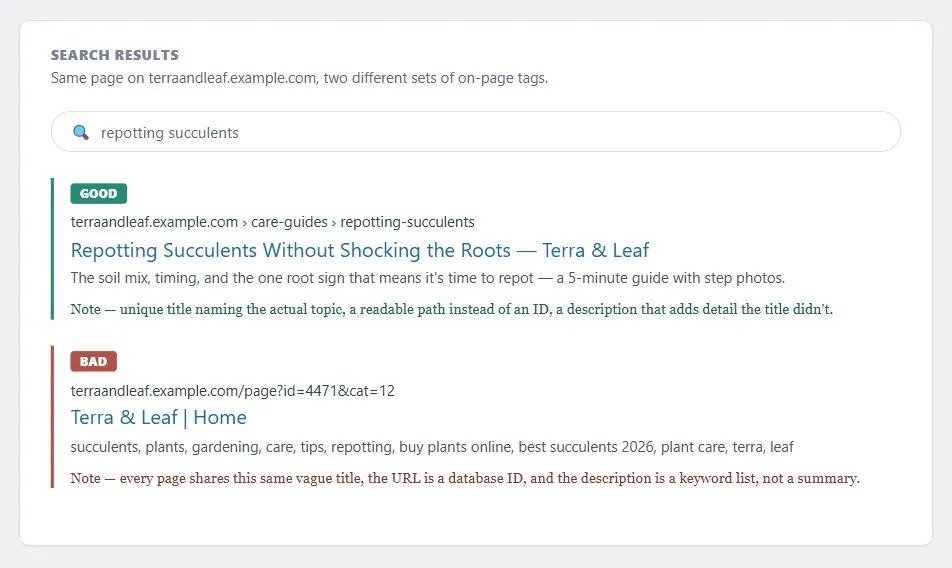 Same page, two different sets of on-page tags — one gives a searcher a specific reason to click, the other gives every page on the site the identical, keyword-stuffed pitch.
Background
Search engine optimization (SEO) is part of the broader category of search engine marketing (SEM); the key distinction is that SEM also encompasses paid search advertising (pay-per-click), while SEO focuses on earning placement rather than buying it.
Problem
A page that search engines can’t crawl, index, or rank competitively — or that violates search-engine guidelines in an attempt to game rankings — loses organic (unpaid) visibility in search engine results pages (SERPs), the primary way most visitors discover a site they don’t already know about.
loses organic (unpaid) visibility in search engine results pages (SERPs), the primary way most visitors discover a site they don’t already know about.
Solution
Search engine optimization (SEO) is the practice of improving a site’s visibility in organic search results. Organic results are ranked by relevance rather than purchased, which makes the ranking algorithm — and designing to work with it — the central concern.
Design for how search engines crawl, index, and rank your site
- Crawling — Automated programs called web crawlers (or “spiders”) systematically follow links from page to page, discovering content to add to the search engine’s index. A page not linked from anywhere that is already indexed may never be found by a crawler.
- Indexing — The crawler’s findings are added to a database, where each page’s content, metadata, and link relationships are stored and made searchable.
- Ranking — When a user submits a query, the engine scores indexed pages against hundreds of factors — keyword relevance, inbound link authority, content quality, page speed, mobile usability, freshness, and engagement signals — and returns the most relevant results.
The PageRank algorithm (developed at Stanford in 1998) was the foundational breakthrough in link-based ranking: it estimates a page’s importance by the quantity and authority of pages linking to it, modeled as the probability that a random web user following links would eventually land on that page. A page with many inbound links from authoritative pages ranks higher than one with many links from low-authority pages.
Get your pages indexed
- XML sitemap — a file listing every URL on the site that should be indexed, submitted through Google Search Console (or Bing Webmaster Tools). Sitemaps ensure deep pages are reachable even if they’re not well-linked internally.
- robots.txt — a plain-text file in the site’s root directory that instructs crawlers which paths to avoid. Commonly used to exclude login pages, internal search results, shopping carts, and user-specific content that would be meaningless in a search result and constitute “search spam.” As of 2020, Google treats robots.txt as a hint rather than a directive.
noindexmeta tag —<meta name="robots" content="noindex">on an individual page tells crawlers not to include that page in the index, even if they visit it. Useful when robots.txt exclusion is too coarse-grained.- Internal linking — pages deep in the site hierarchy that aren’t linked from well-crawled pages may never be discovered. Shallow navigation hierarchies (fewer clicks from the homepage to any page) improve crawl coverage, and internal links to important pages increase how often crawlers visit them.
- Directory grouping — placing topically similar pages in a shared directory (e.g.
/care-guides/) helps a crawler learn how often that section tends to change, which shapes how often it gets recrawled.
Write a unique, descriptive title tag
The <title> element in the HTML <head> is the most important on-page ranking signal and the clickable headline shown in search results. It should be descriptive, include the page’s primary keyword, and be unique across all pages on the site.
A distinctive title earns its keep beyond search results, too: it’s what a browser shows in the tab and uses as the default name when a customer bookmarks the page, saves a desktop shortcut, or later scans their favorites list — a page with a vague or duplicated title (multiple bookmarks all labeled “Part I,” or reusing one page template‘s title unedited across every page it generates) is genuinely harder for a customer to find again, independent of any effect on ranking. One naming convention: base a page’s title on the same path a breadcrumb would show — CNN and CNET both title articles as “Site Name — Section — Headline,” which doubles as useful context in a bookmark list or search result.
As a rough length target, keep a title around 50–60 characters (search engines commonly truncate past 60) and above roughly 10 — a title too short to say anything (“Home,” “My Website”) is exactly as unhelpful for orientation and re-finding as one too long to read at a glance.
The displayed title link in a Google search result isn’t always the literal <title> tag — Google draws on several signals (the <title> element, the page’s main visual heading, og:title meta tags, other large/prominent styled text, and anchor text pointing to the page from elsewhere) and will substitute a better-fitting title if it detects the <title> doesn’t match the page.
Common triggers for this substitution:
- A half-empty title (a leading separator with no text before it).
- An obsolete date left over from a page reused year after year.
- “Micro-boilerplate” titles that are identical or near-identical across many pages on the same site (varying by only one small detail, like a season number).
- More than one heading on the page carrying equal visual weight with no clear single title.
- A title written in a different script/language than the page’s actual content.
Avoiding these specific patterns is what keeps the title you wrote from being silently overridden.
Write a compelling meta description
The <meta name="description"> tag is not a direct ranking factor but strongly influences click-through rate: search engines often display it as the snippet below the title in results. A clear, specific description that matches the page’s content is more likely to earn a click. Aim for roughly 120–150 characters — long enough to say something real, short enough to avoid truncation in most result listings — and make sure it’s a genuine summary rather than a keyword list or a bare restatement of the title: a description should tell a searcher something the title didn’t already, since that’s the whole reason it earns its own line in the result.
a description should tell a searcher something the title didn’t already, since that’s the whole reason it earns its own line in the result.
Don’t rely on the keywords meta tag
<meta name="keywords">, historically populated with the terms customers actually search for (drawn from a site’s own internal search logs), synonyms, common misspellings, and foreign-language translations for international audiences. Modern search engines give it little to no ranking weight, since it became a magnet for keyword-stuffing abuse, but it remains harmless to include for the small set of crawlers that still read it.
Keep markup crawlable and accessible
The same barriers that block assistive technology tend to block crawlers too: <alt> text on images, text alternatives for non-text media, and avoiding content locked entirely behind JavaScript-only navigation or CGI forms all give crawlers a textual path to a page’s content, not just a visual one. See Accessibility for the full accessibility rationale, which holds independent of any SEO benefit. Place an image near the text that discusses it, and write its alt text to reflect that surrounding content — the same contextual-placement principle applies to embedded video, which should sit on its own page with a descriptive title and description rather than being buried inside an unrelated one.
Use descriptive, human-readable URLs
Descriptive, human-readable URLs improve both ranking and click-through. Prefer /about/team over /page?id=47. Use hyphens, not underscores, to separate words (search engines treat hyphens as word separators). Keep URLs as short as is still descriptive. See Permalinks for the complementary concern of designing a URL so it keeps working — and keeps pointing at the same content — indefinitely.
Structure headings hierarchically
A clear H1 naming the page’s topic, followed by logically nested H2/H3 subheadings, helps crawlers understand page structure and improves accessibility simultaneously — Google states plainly that heading order itself isn’t a ranking factor, so the payoff here is a screen reader’s ability to navigate the page, not a search-ranking boost.
Keep content high-quality and fresh
Search engines reward accurate, in-depth content that earns inbound links naturally. Thin or duplicated content is penalized. Updating content regularly signals freshness and invites more frequent crawling.
Canonicalize duplicate URLs
When the same page is accessible at multiple URLs (e.g. with and without a trailing slash, with HTTP and HTTPS, or via a content delivery network (CDN) URL), a canonical link element (<link rel="canonical" href="...">) or 301 redirect consolidates link authority to a single preferred version rather than splitting it across duplicates.
Mark untrusted or user-generated links with nofollow
Add a nofollow (or similar) annotation to a link pointing at a site you don’t fully trust, so search engines don’t associate your site with whatever it links to. Since this same risk applies to any link a visitor posts themselves — a comment, a forum reply, a review — have the CMS add the annotation automatically to user-generated links rather than relying on manual review to catch each one.
Treat the mobile version as primary, not the desktop one
Since November 2016, Google uses a site’s mobile version as the primary source for indexing and ranking — not the desktop version. A site that renders well on desktop but poorly on mobile is penalized across all devices, not just mobile searches. This makes Responsive Web Design and Mobile-First Design a prerequisite for competitive search visibility, not an optional enhancement.
Favor white-hat SEO over black-hat or grey-hat shortcuts
- White hat — Techniques that conform to search engine guidelines: creating genuinely useful content, earning inbound links naturally, using accurate metadata, and maintaining good site structure. Produces durable results because it aligns with what ranking algorithms are designed to reward.
- Black hat — Techniques that game ranking signals in ways search engines prohibit: hidden text (same color as background), cloaking (showing different content to crawlers than to humans), paid link schemes, doorway pages, using trademarks owned by other sites as keywords, and repeatedly resubmitting the same URL to force a recrawl. Risks penalties ranging from ranking reduction to complete removal from the index.
- Grey hat — Approaches that aren’t explicitly prohibited but don’t optimize for genuine user value. Avoids the worst penalties but doesn’t produce the durable ranking gains of genuine white-hat work.
BMW Germany and Ricoh Germany were both de-indexed in 2006 for doorway-page cloaking, a black-hat technique; both were restored after removing the offending content.
Some ranking damage is self-inflicted rather than deliberately malicious: duplicate <title> tags across pages, the same content reachable at multiple URLs (see canonicalization above), a <meta> refresh tag that keeps reloading a page, or content a crawler simply can’t reach — because it sits behind a sign-in form, inside a site’s own internal search results, or is only reachable through JavaScript-only navigation with no plain hyperlink fallback.
Handle international SEO
International SEO requires more than translating content into the target language — it involves URL strategy (ccTLDs vs. subdirectories vs. subdomains), hreflang tags pointing each localized page to its equivalents in other locales, local hosting or CDN nodes for page-speed signals, and transcreation (cultural adaptation, not just translation) for local relevance. See Internationalization for full coverage.
Monitor for algorithm changes
Search engines update their ranking algorithms continuously — Google reported over 500 changes in a single year. Organic rankings carry no guarantee of stability. The practical implication for site maintenance is that SEO is an ongoing practice, not a one-time configuration: monitor rankings, watch for algorithm update announcements, and keep content current.
SEO is an ongoing practice, not a one-time configuration: monitor rankings, watch for algorithm update announcements, and keep content current.
Related Concepts
Patterns
- Internationalization
- Responsive Web Design
- Mobile-First Design
- Page Template
- Sign-In and Account Creation
- Permalinks
- Site Map (Navigation Page)
- Headlines and Blurbs
- Alt Text
Principles
Further reading
Moz’s “The Beginner’s Guide to SEO” (commercially published, no stated open license) widens this page’s Google-only sourcing with an independent industry perspective — a keyword-research methodology and a dedicated measuring-and-tracking-performance chapter this page doesn’t cover, plus its own myth-corrections about ranking factors alongside Google’s.
Sources
Search engine optimization (Wikipedia) (CC BY-SA 4.0) supplies the crawling/indexing/ranking mechanics, the PageRank origin story, the November 2016 mobile-first-indexing shift, the white-hat/black-hat/grey-hat framework with the BMW Germany and Ricoh Germany de-indexing example, and the note that Google reported over 500 algorithm changes in a single year.
The Design of Sites: Pattern Group D — Writing and Managing Content (Pattern Group D, D6 and D9) is the source for the historical framing of the keywords meta tag’s legacy role and the breadcrumb-based title-naming convention (the CNN/CNET “Site Name — Section — Headline” pattern), plus the point that a distinctive title matters for bookmarking and browser tabs independent of ranking.
Influencing Title Links in Google Search (Google Search Central) (CC BY 4.0) is the direct source of the paragraph on when Google substitutes its own title for a page’s literal <title> tag — the signals it draws on (visual heading, og:title, anchor text) and the specific substitution triggers (half-empty titles, obsolete leftover dates, near-identical micro-boilerplate titles, competing headings, script/language mismatches).
SEO Starter Guide (Google Search Central) (CC BY 4.0) is the source of the nofollow link-annotation guidance, the directory-grouping crawl-frequency point, the image/video contextual-placement guidance, and the clarification that heading order isn’t itself a Google Search ranking factor.