
Content Modules
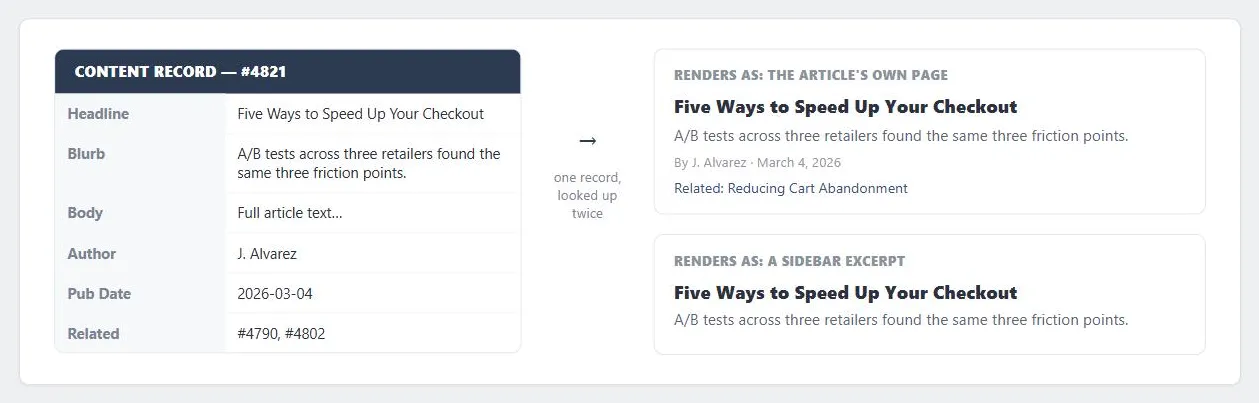 Both previews come from the same record on the left: nothing in the sidebar excerpt was written separately, it just reads two of the record’s six fields.
Problem
Manually recoding, uploading, testing, and revising every page before each content update is slow and error-prone — and by the time a hand-updated page goes live, time-sensitive content may no longer be current. Customers who find a homepage unchanged from their last visit conclude there’s nothing new and stop returning.
Manually recoding, uploading, testing, and revising every page before each content update is slow and error-prone — and by the time a hand-updated page goes live, time-sensitive content may no longer be current.
Solution
A content module is a defined, reusable content area within a page template — the live piece that a publishing system fills in, as distinct from the template’s fixed structural regions. Where the template is the skeleton, content modules are the muscle and flesh: the same template can display entirely different content over time without any redesign, as long as new content is authored to fit the module it will occupy.
Where the template is the skeleton, content modules are the muscle and flesh: the same template can display entirely different content over time without any redesign, as long as new content is authored to fit the module it will occupy.
Store content separately from the template markup
A publishing system built around content modules avoids the manual-recoding problem above: content lives in a file system or a database, separate from the template markup, so publishing new content means updating a record rather than re-coding a page.
Small sites can get by storing articles as individual files; larger or more sophisticated sites — especially ones offering Personalized Content — need a real content database so records can be queried, scored, and targeted rather than just listed.
Structure a content record
Each piece of content bound for a module needs, at minimum: a headline and blurb, body copy, reference information (author, date), and links to related content or products. Storing these as discrete fields in a database record — rather than as one undifferentiated block of markup — is what lets the same article surface consistently in multiple places: the full article on its own page, and its headline/blurb repeated in a sidebar or on the homepage, generated by looking up the same record.
The same record’s fields can drive markup of differing depth depending on where the module is placed, starting with a full rendering on the article’s own page.
<article data-record-id="4821">
  <h2><a href="/articles/4821">Five Ways to Speed Up Your Checkout</a></h2>
  <p class="blurb">A/B tests across three retailers found the same three friction points.</p>
  <p class="byline">By J. Alvarez · <time datetime="2026-03-04">March 4, 2026</time></p>
  <ul class="related-links">
    <li><a href="/articles/4790">Related: Reducing Cart Abandonment</a></li>
  </ul>
</article>
A sidebar excerpt of that same record, generated from the same query, uses only its headline and blurb.
<aside aria-label="Related articles">
  <h2><a href="/articles/4821">Five Ways to Speed Up Your Checkout</a></h2>
  <p class="blurb">A/B tests across three retailers found the same three friction points.</p>
</aside>
Provide publishing tools
An administration page — a web-based form exposing every content field plus a publication date and target location — lets content be published faster and without a developer in the loop, since authors work directly against the module’s fields rather than editing markup by hand.
An administration page — a web-based form exposing every content field plus a publication date and target location — lets content be published faster and without a developer in the loop, since authors work directly against the module’s fields rather than editing markup by hand.
Content modules can also be exposed to the customer rather than only to site administrators: sites with Personalized Content can let customers use direct manipulation to choose which modules appear and where they’re positioned on their own personalized page.
Related Concepts
Patterns
- Page Template
- Headlines and Blurbs
- Personalized Content
- Consistent Sidebars of Related Content
- Direct Manipulation
- Enabling Intranets
- Expanding and Fixed Screen Width
- Permalinks
- Stimulating Arts and Entertainment
Sources
The Design of Sites: Pattern Group D — Writing and Managing Content (Pattern D2, Content Modules) is this page’s sole source — the template/module distinction, storing content separately from markup, structuring a content record, and providing publishing tools all come directly from it.