
Straightforward Search Forms
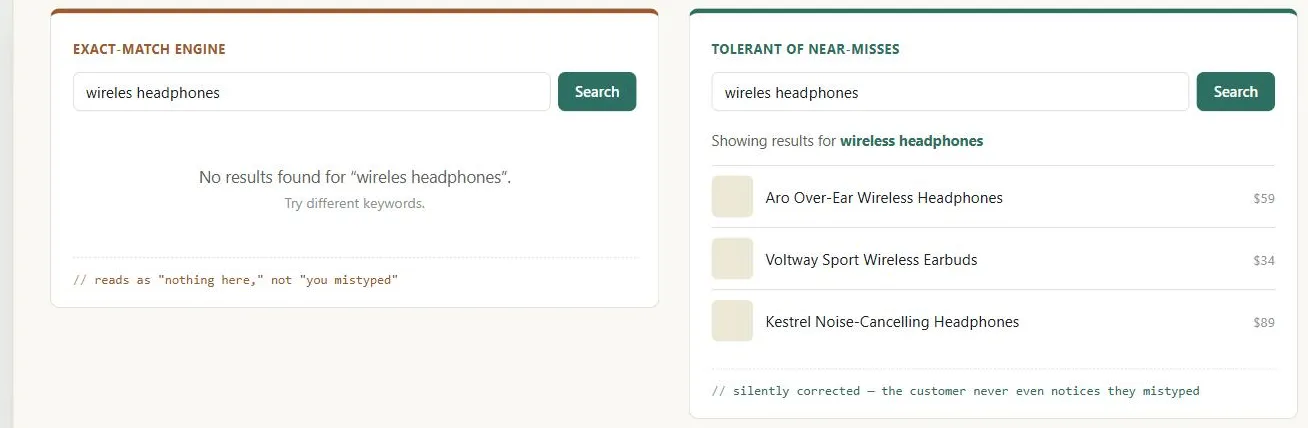 One typo, two outcomes: an exact-match engine treats it as a dead end, a tolerant one treats it as solved.
Background
Straightforward search forms need to live inside a visible Search Action Module that customers can actually find, and the results they return are best presented via Organized Search Results. Search is one of two styles Multiple Ways to Navigate groups under intention-driven navigation (the other being browse) — for the customer who already knows, or roughly knows, what they want. Search is also one of Information Architecture‘s four systems, alongside organization, labeling, and navigation — a direct-query alternative to browsing the organization scheme rather than a replacement for it. What’s cheapest for a search engine to implement (strict Boolean parsing, exact string matching) is generally the opposite of what’s easiest for a customer to use correctly — this pattern is fundamentally about absorbing that complexity on the system side instead of pushing it onto the customer.
What’s cheapest for a search engine to implement (strict Boolean parsing, exact string matching) is generally the opposite of what’s easiest for a customer to use correctly — this pattern is fundamentally about absorbing that complexity on the system side instead of pushing it onto the customer.
Problem
Search forms often demand more precision from customers than they’re willing or able to give, and the most common ways of making a search engine easy to build are exactly the ones that make it hard to use.
Search forms often demand more precision from customers than they’re willing or able to give, and the most common ways of making a search engine easy to build are exactly the ones that make it hard to use.
Solution
Avoid Boolean operators, or hide them behind plain language
“Computer and monitor” finds pages with both words; “computer or monitor” finds pages with either — but that doesn’t align with everyday speech, where people say “search for cats and dogs” and mean either word. Either drop Boolean syntax entirely, or expose the same functionality through explicit phrasing customers already understand — quotation marks for an exact phrase and a leading minus sign to exclude a word are the two conventions that have stayed in everyday use across most current search engines, unlike Google‘s own once-prominent “with all of the words”/“with any of the words” Advanced Search form, which has since been buried out of the main casual-use flow. See Plain Language.
Don’t let an exact-match engine return “no results” for a near-miss
A search for “presentation” failing to find “presentations,” or a typo like “presentatino” returning nothing, reads to the customer as “there’s nothing here” rather than “you mistyped” — the exact-match side of the example at the top of this page, where “wireles headphones” comes back with nothing, is exactly this failure. Compensate with a dictionary check for plurals and misspellings, and account for synonyms your customers actually use for the same thing (laptop vs. notebook, apparel vs. clothes) — mining search log files, as in Organized Search Results, is one way to find which synonyms matter for your specific site.
Compensate with a dictionary check for plurals and misspellings, and account for synonyms your customers actually use for the same thing (laptop vs. notebook, apparel vs. clothes) — mining search log files, as in Organized Search Results, is one way to find which synonyms matter for your specific site.
Default category searches to “all categories”
If a search form requires picking a category first, a customer who doesn’t notice the field can end up with zero results through no fault of their own; defaulting to search across everything avoids that failure mode.
Related Concepts
Patterns
Principles
Processes
Sources
The Design of Sites: Pattern Group J — Making Site Search Fast and Relevant is this page’s J2 pattern source — the case against Boolean search syntax and exact-match-only engines, the dictionary/synonym compensation for near-miss queries, and defaulting category searches to “all categories.”