
AI Content Marking
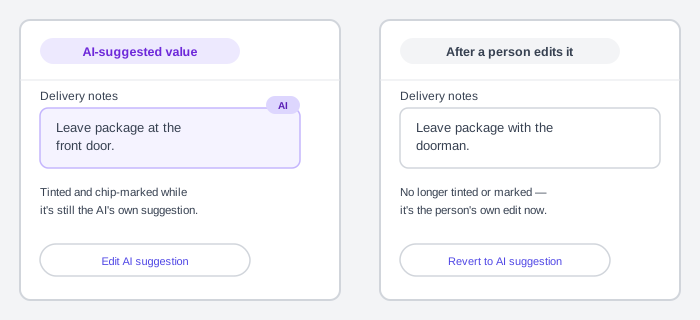 The marker and the edit it describes travel together — change one, and the other has to change with it.
Background
AI-generated or AI-recommended content routinely sits next to ordinary human-authored content in the same interface — a suggested form value, a chatbot reply, a generated image — with no built-in way to tell one from the other. Marking that content is a narrower, interface-level companion to the oversight and trust-calibration principles in Human-AI Interaction: a person can only calibrate trust once they know what actually produced what they’re looking at. The same marker has to do double duty, working both as an in-the-moment visual cue and, where content might travel beyond the interface that first showed it, as something durable enough to survive that trip. Live Chat Support covers the mirror-image version of this same ambiguity — establishing that a reply is not AI-generated, in a channel where people default to suspecting it might be.
Problem
A person looking at a piece of content or a filled-in value has no built-in way to tell whether an AI system produced it, contributed to it, or had nothing to do with it. That ambiguity holds whether the content stays inside the interface that generated it or gets copied, screenshotted, or redistributed somewhere else entirely.
A person looking at a piece of content or a filled-in value has no built-in way to tell whether an AI system produced it, contributed to it, or had nothing to do with it.
Solution
Give AI-generated or AI-recommended content a single, consistent, scope-matched marker, and back it with a durable, machine-readable signal wherever the content might travel beyond the interface that first showed it.
Use one consistent, scope-matched visual marker
Give AI-generated or AI-recommended content a single visual marker used everywhere it appears, so users build a reliable expectation for what “AI is involved here” looks like rather than meeting it as a fresh surprise each time. Match the marker’s own scope to how much of the experience is actually AI-driven — a single AI-suggested word inside a sentence and an entire AI-generated page need different signal weights, but either way a user should be able to tell how far the AI’s involvement actually reaches.
Reserve the marker strictly for real AI involvement: using an “AI look” as decoration on content that isn’t actually AI-generated undermines the trust the marker exists to build. A persistent visual motif shown throughout an interaction — Federal Student Aid’s virtual assistant Aidan uses an owl icon for exactly this — can double as this kind of standing marker rather than a one-time disclosure a user might miss or forget. In a chat-style interface specifically, apply the marker at the level of each individual message rather than once at the top of the conversation — see AI Chat Interface.
Calibrate how prominently and how often to disclose against five factors, rather than applying one fixed rule everywhere:
- Objective — what the disclosure itself needs to accomplish in this context.
- Context of use — the setting the AI feature actually operates in.
- Risk — how likely a misunderstanding is, and how bad the consequence would be if a user didn’t realize AI was involved.
- Audience — who’s actually receiving the disclosure.
- Frequency — how often the disclosure needs to repeat to stay noticed without becoming background noise a user tunes out.
Disclose in text when a visual marker won’t survive
The marker doesn’t have to be a visual UI element — a plain disclosure sentence works too, and is sometimes the only option: a chatbot response might simply state “this response has been written by an automated AI chatbot” rather than relying on a styled label, which matters wherever the output travels somewhere a visual marker won’t survive — copied-and-pasted text, a plain-text email, an API response consumed by another system. Disclose plainly regardless of whether the assistant has a name: a bot with a warm enough persona can read as human even without one, so the disclosure needs to be explicit rather than left for the user to infer from how the assistant happens to come across.
Layer the marker into a discussable path to explanation
Make the marker double as the entry point to explanation, not just a badge. Attaching an on-demand popover to it gives a consistent, discoverable path into explainability (see Explainable AI) without needing a permanent explanation panel that clutters everything else. Layer the popover itself — lead with a short, in-context summary, and let a user dig into more detail only if they actually want it, rather than front-loading detail nobody asked for. Treat that path as the start of a conversation rather than a one-way disclosure: give the user a way to actually discuss the explanation with a competent human being, not just more layers of static text to read through on their own.
Keep the marker itself legible
The marker needs to stay legible on its own terms, not just point at something else that is: test it for color contrast the same as any other UI element, keep any glow or light effects used to distinguish it subtle enough that they don’t themselves reduce readability, and confirm it reads correctly in both light and dark themes.
Drop the AI styling once a person edits the value
When a person edits or overrides an AI-suggested value inside a component (a filled-in form field, a suggested tag, a generated table cell), the component should visibly drop the AI styling and revert to its plain, human-edited appearance. It’s no longer accurate to mark it as AI-generated once a person has changed it. Keep a specific, visible control to switch back to the original AI suggestion, distinct from re-triggering the AI from scratch, so the override is reversible rather than a one-way door.
When a person edits or overrides an AI-suggested value inside a component (a filled-in form field, a suggested tag, a generated table cell), the component should visibly drop the AI styling and revert to its plain, human-edited appearance.
Pair the marker with machine-readable provenance for content that travels
A visible marker only lasts as long as the interface that showed it — it doesn’t travel with content that gets screenshotted, copied, or redistributed beyond that interface. For content at real risk of that (an image, a video, anything likely to circulate independently), pair the visible marker with a machine-readable signal embedded in the content itself, so the AI origin can still be verified downstream after the visible marker is gone.
A visible marker only lasts as long as the interface that showed it — it doesn’t travel with content that gets screenshotted, copied, or redistributed beyond that interface.
The C2PA standard’s Content Credential (also called a manifest) is one concrete way to do this: a cryptographically signed record attached to an asset stating what was done to it (created, edited, published), by which actor, and its ingredients — the sources that fed into it, including, for a generative AI system specifically, the prompt that produced it. A hard binding ties the manifest to the exact bytes of the asset, so any edit — even a single pixel — invalidates it. A soft binding (an invisible watermark or a content fingerprint) trades that precision for durability: it survives the kind of re-encoding a social media platform applies automatically, letting a manifest that’s been stripped from the file still be recovered from a separate manifest store. Because fingerprint-based matching is approximate rather than exact, a credential recovered this way should be surfaced to the person checking it for manual confirmation rather than asserted as certain.
Meet binding disclosure minimums where they apply
Some jurisdictions make a version of this disclosure a legal floor, not just good practice. The EU AI Act’s Article 50 requires a provider of a chatbot or other AI system that interacts directly with a person to make sure that person is informed they’re talking to an AI, unless that’s already obvious to a reasonably informed person from context — disclosed no later than the first interaction. The same article requires anyone deploying a deepfake, or AI-generated text published to inform the public on a matter of public interest, to disclose that origin, with an exception once the content has gone through genuine human editorial review with a named party taking responsibility for it, and a separate exception for purely assistive edits that don’t substantially alter deployer-supplied input.
Providers of systems that generate synthetic audio, image, video, or text carry a parallel, provider-side duty to mark that output in a machine-readable format detectable as AI-generated — a legal backstop for exactly the kind of provenance signal the C2PA standard above implements voluntarily.
Related Concepts
Patterns
Principles
Further reading
Google DeepMind’s SynthID (Google, no stated open license) is a real, deployed example of the soft-binding watermark this page describes abstractly via C2PA — an invisible signal embedded directly into generated images, audio, video, and text.
Sources
Carbon Design System: Accessibility, Content, Color, Motion, Spacing, and Icon Guidelines (IBM) is the source for the consistent AI-content marker guidance, the layered-popover approach to explainability, the revert-to-AI affordance for overridden AI suggestions, and the accessibility constraints on the marker’s own styling (contrast, limited glow, light/dark theme parity) — drawn from its Carbon for AI guideline page.
AI Playbook for the UK Government is the source for the plain-text chatbot-disclosure example and the watermarking/provenance-metadata guidance for AI-content markers that need to survive redistribution.
Federal chatbot and virtual-assistant case studies (Digital.gov) is the source for disclosing AI involvement regardless of whether an assistant is named, and the persistent-icon-as-ongoing-marker example (Federal Student Aid’s Aidan).
AI Risk Management Framework: Generative Artificial Intelligence Profile (NIST AI 600-1) is the source for the five-factor (objective/context/risk/audience/frequency) framework for calibrating how prominently and how often to disclose AI involvement.
C2PA and Content Credentials Explainer is the source for the Content Credential/manifest description, the ingredients concept (including the generative-AI prompt as an input ingredient), the hard-binding/soft-binding distinction, and the manual-confirmation caution for fingerprint-recovered credentials.
EU AI Act — Article 50 (Transparency Obligations) is the source for the EU AI Act’s chatbot-disclosure, deepfake/public-interest-text-disclosure, and machine-readable-marking obligations, including their stated exceptions.