
Search Action Module
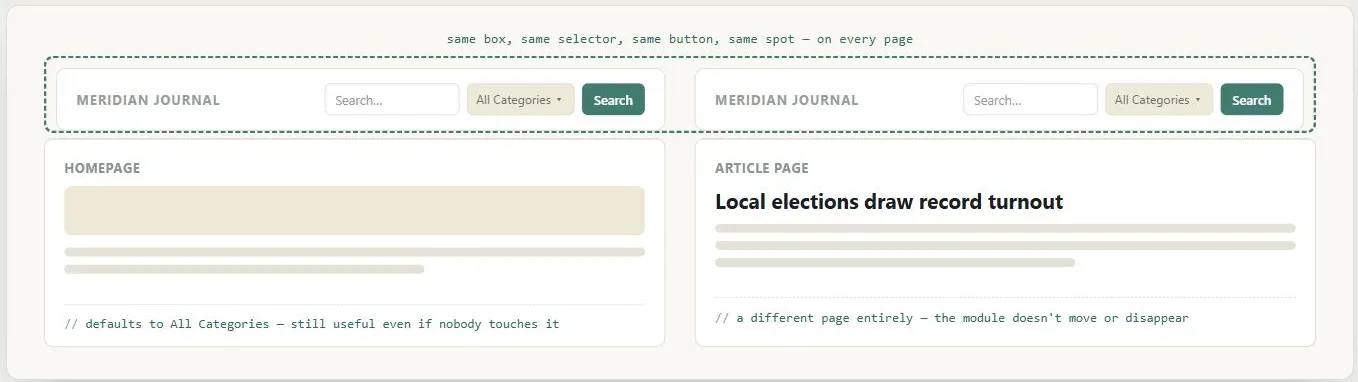 The module has to survive the jump from a homepage to a random article without moving, shrinking, or asking the visitor to find a dedicated search page first.
Problem
Customers who know exactly what they want need a fast way to jump to it, but a full search page is often too complex to be worth using for a quick lookup.
Customers who know exactly what they want need a fast way to jump to it, but a full search page is often too complex to be worth using for a quick lookup.
Solution
Put a simple search box plus an action button on every page, in a consistent location (above the fold — top left, middle, or right), rather than relying on a separate, more complex search page. Consistency of placement matters because customers may initiate a search from any page on the site.
Consistency of placement matters because customers may initiate a search from any page on the site.
<form role="search" action="/search">
  <label for="site-search">Search</label>
  <input id="site-search" type="search" name="q">
  <button type="submit">Search</button>
</form>
For large sites with many content categories, a search selector (a dropdown narrowing the search to a subsection) can be added once a plain free-text search starts returning too many undifferentiated results. Two design considerations matter here: the selector needs a sensible default category (so a user who doesn’t change it still gets relevant results), and a selector is not worth adding on a small site that can’t produce enough results per category to justify it.
a selector is not worth adding on a small site that can’t produce enough results per category to justify it.
Search results returned by the module are presented on an organized results page; if a query needs more precision than a simple box allows, the site can offer a more detailed search form as a secondary option.
This pattern is the second worked example (alongside Action Buttons) used to walk through the full pattern format in Web Design Patterns.
Related Concepts
Patterns
Processes
Sources
The Design of Sites: Pattern Group J — Making Site Search Fast and Relevant is the direct source of the pattern itself (J1 in Pattern Group J) — the search-box-plus-action-button placement guidance and the search-selector default-category and results-threshold considerations covered under Solution.
The Design of Sites: Ch. 2 — Making the Most of Web Design Patterns (the book’s introductory chapter explaining its pattern-language format) is the source for this page’s closing note that Search Action Module serves as the second full worked example — after Action Buttons — used to walk through the six-part pattern format.