
AI Chat Interface
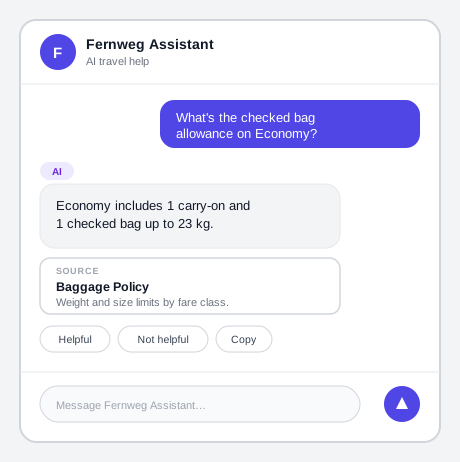 Every element a person actually sees — the AI label, the citation, the feedback row — sits at the level of one message, not just once for the whole window.
Background
A chat-style window is a common way a person interacts directly with an AI-powered feature — asking a question, getting a generated answer, and deciding how much to trust it, all inside one continuous back-and-forth. It still relies on the disclosure and trust-calibration principles covered in AI Content Marking and Human-AI Interaction, but it’s also a distinct piece of interface with its own recurring structural parts, its own way of showing where an answer’s information came from, and its own conventions for keeping an open-ended exchange short and directed. See Voice User Interface for the same kind of exchange with no screen at all, and Live Chat Support for the human-staffed version of this same chat-window pattern, where the design problem is establishing that a reply isn’t AI-generated rather than disclosing that it is.
Problem
A chat-style exchange behaves differently from a static page: a reply is delayed rather than instant, may lean on external sources a person needs to judge, and can run on indefinitely without something directing it toward a close.
A chat-style exchange behaves differently from a static page: a reply is delayed rather than instant, may lean on external sources a person needs to judge, and can run on indefinitely without something directing it toward a close.
Solution
Build the chat window from a small set of recurring structural parts, and give each message — not just the window as a whole — its own origin marking, generation state, sourcing, and response controls.
Confirm the interface earns a conversational format
Build a chat interface only where it adds genuine value — faster task completion, a personalized answer, a real efficiency gain — not because a conversational format is trendy. A chat window carries real interaction cost: a whole open-ended back-and-forth a person has to read and respond to, where a single well-placed field, button, or static answer would resolve the same task with less effort.
Give a chat window a consistent structure
Build a chat window from the same handful of structural parts regardless of the product: a container holding the whole conversation, a toggle that shows or hides it without navigating away, a header identifying what the assistant is, a scrolling list of messages, and a footer holding the text input and its controls. Keep the conversation’s history visible and scrollable within that same container rather than truncating it, so a person can scroll back to something said earlier without restarting the exchange.
Mark every message’s AI origin, not just the window once
Apply the AI marker at the level of the individual message, not only once at the top of the conversation. Give bot and user messages a distinct visual treatment — background color, alignment, or both — in addition to a per-message “AI” label on bot messages, so the origin of any single message stays legible even to someone who lands mid-conversation without having seen the top of it.
Show a visible indicator while a response is still generating
A chat response’s own loading state takes a specific conventional form: a “thinking” or “typing” indicator shown in the space where the reply will appear, rather than a generic spinner placed elsewhere on the page. It tells a person specifically that a reply is coming, not just that the system is doing something.
Show a cited source as a card, not a bare link
When a response draws on retrieved external sources, show each one as its own card rather than a bare inline link — a descriptive one-line title plus a short body description gives a person enough context to judge whether the source is worth opening before they click through. A citation inside a chat message can’t lean on surrounding sentence context the way an inline link on an ordinary page can, since the message itself is often the only context there is.
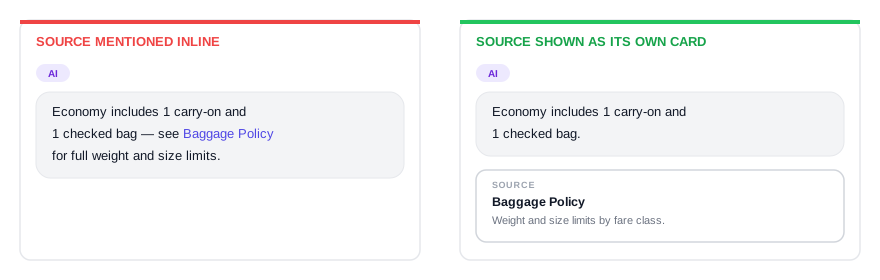 A bare link asks someone to click through blind; a title and a one-line description let them decide first.
A citation inside a chat message can’t lean on surrounding sentence context the way an inline link on an ordinary page can, since the message itself is often the only context there is.
Support attachments with a preview and an editable copy
Let a person attach a file to a message and see it represented as a dismissible label rather than disappearing into the message text. Give an attached file its own read-only preview, plus a distinct edit affordance for revising it interactively — kept separate from re-triggering the AI response from scratch, the same reversibility an overridden AI suggestion gets elsewhere.
Give a person a way to react to a response
Attach a small set of actions to each bot response — positive/negative feedback, copy, share, and, where relevant, a listen-aloud option — so a person doesn’t have to trust a response silently or restart the exchange to register that it was wrong. The interface only needs to surface these controls; routing the feedback back into the system and correcting the response are what actually close the loop.
Write short, directed messages
Keep a bot message to about three lines of text, and stop after at most three consecutive bot messages before asking for user input — a chat surface that keeps talking without ever asking anything back stops reading as a conversation. A few more specific rules keep messages inside that budget:
- End a message on its actionable point, not its setup. State context or a request first and close on what happens next or why it matters, so a person can grasp the message from its last sentence alone even when skimming the rest.
- Explain why before asking. When a message requests something a person might hesitate to give, such as personal information, state why it’s needed before asking for it rather than after.
- Avoid open-ended questions. An open text field with no options attached invites an answer the system can’t parse; where a question genuinely needs one, keep it narrow and allow extra time before treating silence as a non-response.
- Mix cards and buttons in with plain text rather than relying on typed replies alone — a short list of concrete choices lowers the odds a person types something the assistant can’t handle.
- Let the bot deliver the conversation’s last message. Personalize a greeting with the person’s name when it’s available, and close out a concluded session with a goodbye message rather than leaving the person’s own message sitting as the final, unanswered turn.
Keep a bot message to about three lines of text, and stop after at most three consecutive bot messages before asking for user input — a chat surface that keeps talking without ever asking anything back stops reading as a conversation.
Hand off once the assistant reaches its limit
Once a conversation reaches the edge of what the assistant can resolve, hand off per the oversight guidance for real-time systems rather than leaving the person stuck mid-exchange.
Related Concepts
Patterns
Principles
Further reading
Nielsen Norman Group’s “10 Guidelines for Designing Your Site’s AI Chatbots” (commercially published, no stated open license) backs this page’s PatternFly-sourced guidance on keeping messages short and directed with independent research recommending clickable suggested prompts and clear capability statements up front.
Sources
PatternFly AI: Conversation and Chatbot Guidelines (Red Hat) is this page’s sole source — its chat-window structural components, per-message marking, thinking-indicator convention, citation-card format, attachment preview/edit pattern, response-reaction controls, and conversation-design writing rules all come from PatternFly AI’s guideline pages.