
Enabling Intranets
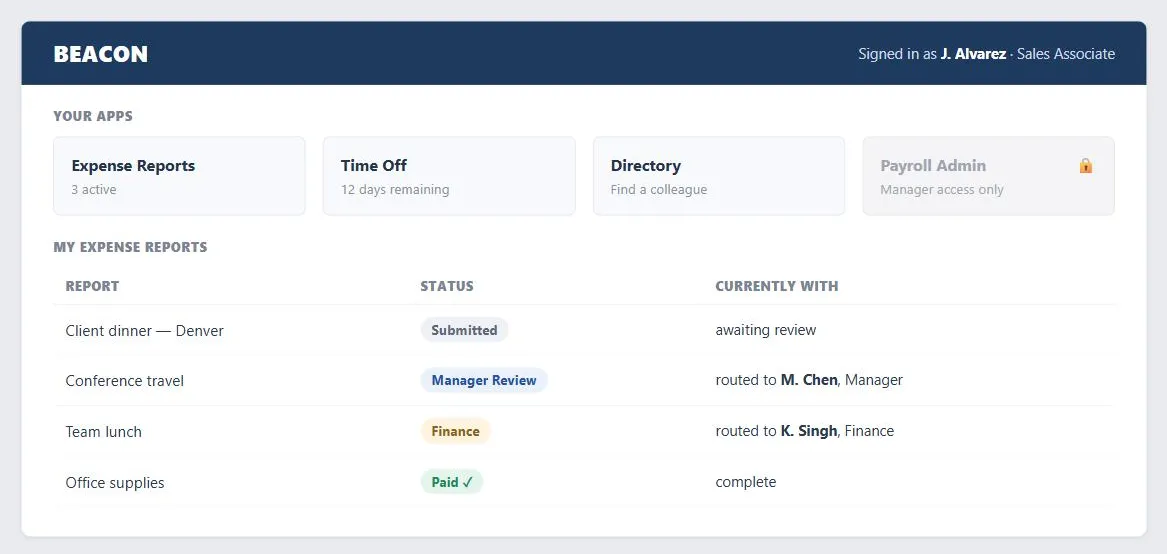 The locked Payroll Admin tile is role-gating in action; the expense report moving on its own from submission to manager to finance is the workflow automation that separates an intranet from a static information portal.
Problem
Employees’ roles and responsibilities change over time, and they shouldn’t have to relearn an entirely new system every time they do — an intranet has to stay useful and consistent as the org around it keeps changing.
Employees’ roles and responsibilities change over time, and they shouldn’t have to relearn an entirely new system every time they do — an intranet has to stay useful and consistent as the org around it keeps changing.
Solution
An intranet is the one site genre built for internal employees rather than external customers; build it around personalized, role-based views and workflow automation that adapt as roles change, backed by a consistent template and interaction vocabulary across every internal tool.
Build personalized, role-based views
Not every employee should see every application or piece of information — salary data and financial tools are the obvious examples of content that should be role-gated rather than universally visible. Build the intranet around personalized, role-scoped views rather than one shared homepage, since what’s relevant (and what’s appropriate to show) genuinely differs by role, and roles change as employees are promoted or move teams.
Support workflows, not just information
Because an intranet connects every employee, it can automate the handoffs between them — an expense report submitted by an employee can route automatically to their manager and then to finance, without anyone re-keying it or manually forwarding an email. This kind of workflow automation generalizes to any process that moves between roles (approvals, requisitions, reviews) and is a genuinely different value proposition from an intranet that’s just a static information portal; see Web Apps That Work for the underlying application-design pattern these workflow tools are built from.
Because an intranet connects every employee, it can automate the handoffs between them — an expense report submitted by an employee can route automatically to their manager and then to finance, without anyone re-keying it or manually forwarding an email.
Keep terminology and patterns consistent across every internal tool
Keeping terminology and interface patterns consistent across every internal Web application matters more on an intranet than almost anywhere else, because the same employees encounter dozens of these tools over a career and each inconsistency is relearned cost paid by the whole organization repeatedly. A consistent template and interaction vocabulary means an employee who’s used one internal tool can transfer that knowledge to the next one the company builds, rather than starting over each time.
Keeping terminology and interface patterns consistent across every internal Web application matters more on an intranet than almost anywhere else, because the same employees encounter dozens of these tools over a career and each inconsistency is relearned cost paid by the whole organization repeatedly.
Govern content and roll out gradually
Before deploying broadly, settle who can publish new intranet content — everyone, or a dedicated team — and what if any checks exist to keep confidential information from being published where it shouldn’t be. As with most ambitious internal systems, start with a narrow, high-value slice (basic document/news access, content modules for simple publishing) and expand into workflow automation once the foundation is solid, rather than attempting the full system in one release. Employees typically reach the intranet from outside the company firewall through a secure sign-in (see Sign-In and Account Creation and Customer Sessions), landing on a personalized homepage showing their own pending requests and navigation to whatever applications their role uses.
Related Concepts
Patterns
- Personalized Content
- Content Modules
- Multiple Ways to Navigate
- Customer Sessions
- Sign-In and Account Creation
- Web Apps That Work
- Page Template
- Blogs
Further reading
The Nielsen Norman Group’s Intranet Design Annual 2005 (media.nngroup.com/media/reports/free/Intranet_Design_Annual_2005.pdf — copyright NN/g, no open license) includes a Cisco intranet redesign that cut the average time to navigate from the intranet homepage to a subsite by 17.6 seconds per task, estimated at roughly $3 million a year in aggregate employee time saved.
Sources
The Design of Sites: Pattern Group A — Site Genres is this page’s A11 Enabling Intranets pattern source — role-based personalized views, workflow automation between roles, and the case for consistent terminology and patterns across every internal tool.