
Web Apps That Work
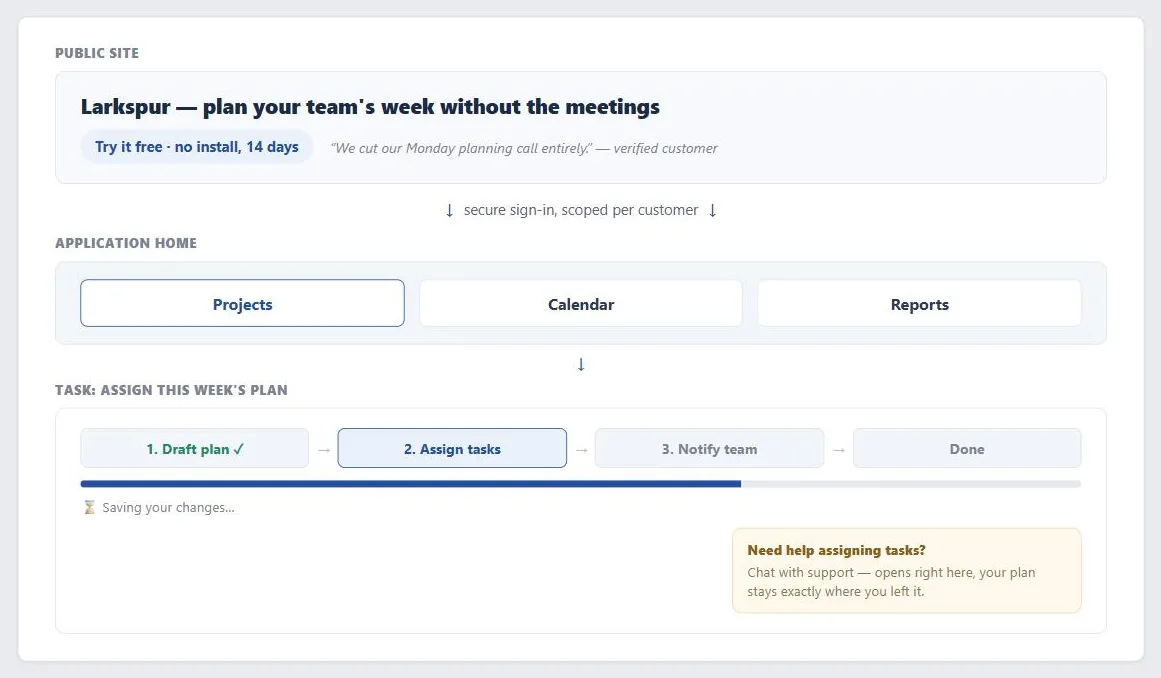 From free trial to daily use, the app keeps explaining itself: a secure per-customer gate, feedback the moment anything is saving, and help that opens without losing the plan underneath it.
Problem
A Web application is sold and used differently from a traditional Web site: customers expect to try it before buying, use it for real, sustained work (often hours a day, not a quick visit), and get it without an installation step. That raises the bar on usability, since people evaluate a Web app by using it directly rather than by committing to a purchase first, the way they do with shrink-wrapped software.
That raises the bar on usability, since people evaluate a Web app by using it directly rather than by committing to a purchase first, the way they do with shrink-wrapped software.
Solution
State the value proposition clearly, let visitors try the application directly before committing, give explicit feedback for anything with real latency, and make help and account/security controls available at the point of need — the concrete tactics below.
Let visitors try before they buy
State the value proposition clearly on the homepage, show the application in action via screenshots or a walkthrough before asking for commitment, and — where feasible — let a visitor create a temporary account and use a real trial rather than only reading marketing copy. Testimonials and external reviews help close the gap between “I read about this” and “I trust this enough to rely on it for real work.”
Testimonials and external reviews help close the gap between “I read about this” and “I trust this enough to rely on it for real work.”
Choose interaction depth deliberately, not just by default technology
A Web app built on plain HTML gets the best cross-platform/cross-browser compatibility, but each page is generally limited to a few atomic actions and can’t offer Direct Manipulation. A richer client-side interaction layer (what the source calls AJAX — Asynchronous JavaScript and XML) can add Direct Manipulation, Predictive Input, and Drill-Down Options, producing something that feels closer to installed desktop software — at the cost of more implementation effort and, at the time of writing, more cross-browser inconsistency. Either way, because Web apps have inherent network latency that installed software doesn’t, give explicit feedback for anything that takes more than about ten seconds — a Progress Bar inside the relevant process funnel — since customers who get no feedback will assume nothing happened and repeat or interrupt the action.
Give context-sensitive help for tools used daily
Unlike a consumer site that needs to be immediately walk-up usable, a Web application customers use for hours a day can reasonably trade some upfront learning time for deeper capability — but that trade only works if Context-Sensitive Help, delivered via Floating Windows so a customer never loses their in-progress work, is genuinely available at the point of confusion. If the app is deployed on a company intranet, keeping its interaction patterns consistent with other intranet applications shortens the learning curve for every new hire, since skills transfer between the company’s own tools.
Secure accounts and manage roles
Because a Web app holds ongoing, often confidential data for many customers, security and privacy need to be visible, not just present: secure connections, a stated data-handling policy, and easy access to privacy preferences from account management — a serious prospective customer will factor this into a purchase decision, not treat it as a footnote. Many Web apps also need to support multiple roles (administrator, primary operator, manager) with different views and permissions, which itself becomes an ongoing maintenance responsibility rather than a one-time setup.
Many Web apps also need to support multiple roles (administrator, primary operator, manager) with different views and permissions, which itself becomes an ongoing maintenance responsibility rather than a one-time setup.
Related Concepts
Patterns
- Up-Front Value Proposition
- Homepage Portal
- Sign-In and Account Creation
- Direct Manipulation
- Predictive Input
- Drill-Down Options
- Progress Bar
- Process Funnel
- Context-Sensitive Help
- Floating Windows
- Account Management
- Privacy Preferences
- Enabling Intranets
Sources
The Design of Sites: Pattern Group A — Site Genres is this page’s A10 pattern source — the try-before-you-buy expectation, the plain-HTML-versus-richer-AJAX-interaction trade-off, and the case for point-of-need context-sensitive help and visible account/security controls in a Web application.