
Organized Search Results
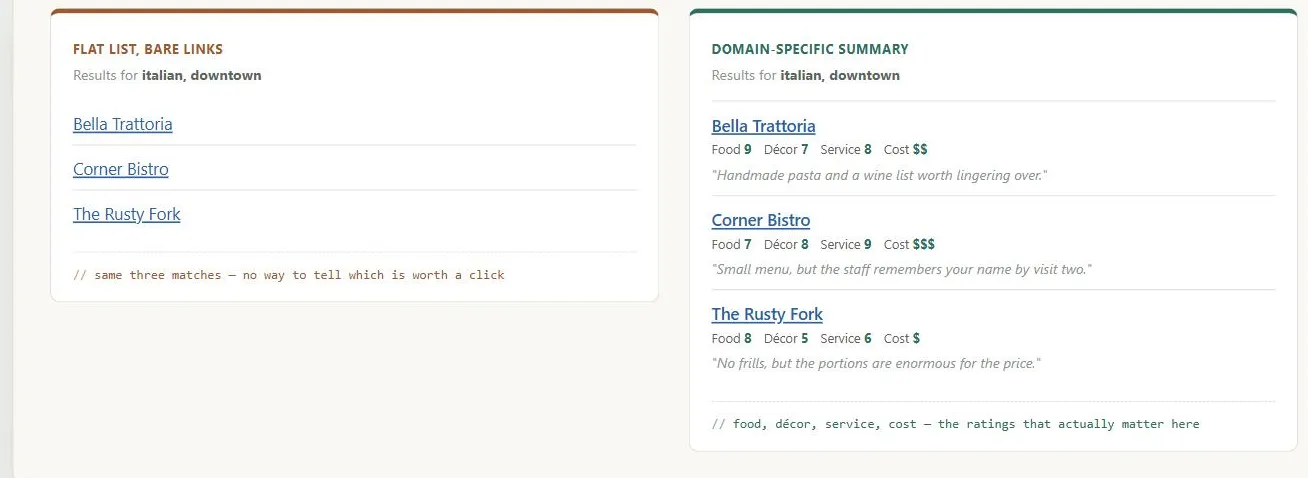 The search engine found the same three matches either way — the ratings and excerpts are what turn “here are some results” into “here’s which one to pick.”
Background
Card Sorting can be used proactively, before launch, to anticipate likely search terms — catching mismatches between customer vocabulary and site terminology ahead of time rather than discovering them later through log-file analysis. Putting search controls at the bottom of a results page can look like it contradicts Above the Fold, but it doesn’t — customers read a results page top to bottom, and the bottom controls only matter once they’ve already scanned everything above and not found what they wanted.
Problem
A search engine is only as good as the results page it produces — speed and recall don’t matter if customers can’t make sense of what comes back, whether there are too few hits or too many.
A search engine is only as good as the results page it produces — speed and recall don’t matter if customers can’t make sense of what comes back, whether there are too few hits or too many.
Solution
Provide relevant, domain-specific summaries
Not bare links — a restaurant-guide site might show a review excerpt plus food/décor/service/cost ratings; an e-commerce site might show price and availability; a message-board search might show the author and posting date. What belongs in a summary depends entirely on the kind of site.
What belongs in a summary depends entirely on the kind of site.
Clearly organize the results
Group hits by a coherent scheme (category, alphabetical, chronological) rather than presenting a flat list, so customers aren’t left sifting through hundreds of undifferentiated hits — see Amazon.com for an example that groups hits into categories like “Books” and “zShops” rather than one flat list.
Give every result a real, descriptive hyperlinked title
Search engines typically just display a page’s HTML title as the result’s name, so a vague or duplicate title undermines the whole results page regardless of how good the underlying match was.
Mine search log files
Find the most common query terms and make sure those terms point to the best possible destination (including a special promoted result alongside the ordinary ones, as IBM does for “notebook” and “laptop” searches), and find and correct the most frequent misspellings — domain-specific terms won’t be in a generic dictionary, so this has to be tailored per site. When a likely misspelling is detected, silently search on the corrected term and show those results rather than a bare “no results found,” which most customers won’t even notice was a correction — Amazon.com does exactly this, correcting “crossing cashm” to “crossing chasm” rather than reporting no matches.
domain-specific terms won’t be in a generic dictionary, so this has to be tailored per site.
Support common search tasks directly on the results page
Repeat the search box at both the top and the bottom of a long results page (so refining or restarting a search doesn’t require scrolling back up), and make pagination targets (e.g., a “Next” link) large rather than a small word, which doubles as an Accessibility win for customers with limited motor control (the same size/distance trade-off Fitts's Law formalizes) — see Google for a model results page that does both.
Related Concepts
Patterns
- Search Action Module
- Straightforward Search Forms
- Above the Fold
- Content Organization Schemes
- Filters and Facets
- Location-Based Services
Principles
Processes
Further reading
Schade, Cheng, and Sherugar’s Top 10 Enduring Web-Design Mistakes (Nielsen Norman Group, 2016 — copyright NN/g, no open license; https://www.nngroup.com/articles/top-10-enduring/) names “poor search results” as one of ten recurring mistakes, recommending search-log review and “Best Bets” (manually promoted results for high-value queries) as remedies. See also Filters and Facets for a related but distinct failure mode the same source documents.
Sources
The Design of Sites: Pattern Group J — Making Site Search Fast and Relevant is this page’s source — Pattern J3, covering domain-specific result summaries, organizing hits into a coherent scheme, real descriptive hyperlinked titles, log-file-driven tuning for common query terms and misspellings, and supporting common search tasks directly on the results page.