
Email Communications
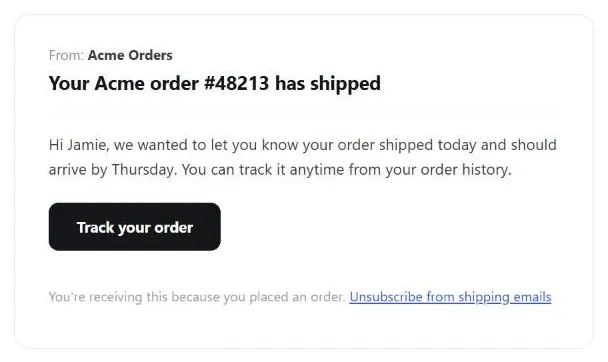 A subject line and opening sentence that reference the actual order read as legitimate in a way a generic greeting never will — the same craft that builds trust is what a phishing email tries hardest to fake.
Background
The same craft techniques (clear subject lines, transaction-referencing openers, consistent sender identity) that make legitimate email trustworthy are the ones phishing scams try hardest to imitate. That’s why writing good notification email and defending against phishing are the same design problem seen from two angles (see Preventing Phishing Scams for the attacker’s side of this).
The same craft techniques (clear subject lines, transaction-referencing openers, consistent sender identity) that make legitimate email trustworthy are the ones phishing scams try hardest to imitate.
Problem
Email is one of the cheapest ways to maintain contact with customers, but unwanted, dubious-looking, or hard-to-read messages get ignored — and poorly-designed transactional email trains customers into exactly the habits (clicking embedded sign-in links, trusting a familiar-looking layout) that phishing scams exploit.
Email is one of the cheapest ways to maintain contact with customers, but unwanted, dubious-looking, or hard-to-read messages get ignored — and poorly-designed transactional email trains customers into exactly the habits (clicking embedded sign-in links, trusting a familiar-looking layout) that phishing scams exploit.
Solution
Distinguish two categories
- Subscriptions, for opt-in, scheduled content. Periodic and opt-in — content the customer actively signed up for. Three kinds: newsletters (tips, press, new content), focused advertisements (promotions, new products), and periodic reminders (e.g. restating the Privacy Policy or a phishing warning). Good places to offer sign-up: the Homepage Portal, the account-creation page, and a search-results page offering to notify the customer when new matches appear (see Organized Search Results).
- Notifications, for event-triggered, transactional messages. Immediate and transactional — triggered by a specific event rather than a schedule: an order confirmation, a shipment notice (see Order Tracking and History), new-account creation, an address or password change, or a privacy-policy update. A high/low-priority split governs whether customers can opt out: account-critical notifications (new-account creation, shipment tracking) should always be sent regardless of preference; lower-priority notifications (site updates, promotions) should be opt-out-able through account-level preferences.
Write both well
- Use an inverted-pyramid structure — most important information first, short paragraphs, headings and bulleted lists for scanning. People receiving 70+ emails a day skim; front-load the point.
- Write a specific subject line that names the sender and the reason for the message — “Revision to your Amazon.com account” works; “Thank you for your purchase” or “Order received” don’t, because they can’t be found again later and don’t establish legitimacy at a glance.
- State the purpose in the first line, referencing the actual transaction or request that triggered it. This is also the single strongest anti-phishing move available: an email that opens by referencing something the customer genuinely just did reads as legitimate in a way a generic greeting never will.
- Use a simple, recognizable sender name — an organization or department name (“XYZ Corp Orders”) reads as more trustworthy than an unfamiliar personal name, which people are more likely to flag as spam.
- Prefer plain text over HTML unless you know the recipient’s client renders HTML well; some readers can’t display it at all and see raw markup instead. If sending plain text, wrap at roughly 70 characters and avoid smart/curly quotes, which can render as garbage characters in some clients.
- Ship images as attachments, not remote links. Many email clients block remotely-linked images by default (originally a response to senders using them to track opens), so anything essential to the message needs to travel with it — and keep file sizes small regardless.
- Always include subscribe and unsubscribe instructions in every message — subscribing in case the recipient forwards it to someone else, unsubscribing (ideally via a link rather than a reply-to address) for people no longer interested. Mirror the same instructions on a frequently asked questions (FAQ) page.
- Use addresses only for what you disclosed — the choice principle from fair information practices: default to opt-in rather than opt-out whenever you want to use a customer’s email address for something beyond what they originally signed up for.
- Tell people clearly if a reply-to address isn’t monitored. If customers can’t get a response by replying, say so at the top of the message and give them another way to ask questions — a phone number or a link to the site.
an email that opens by referencing something the customer genuinely just did reads as legitimate in a way a generic greeting never will.
Related Concepts
Patterns
- Plain Language
- Quick-Flow Checkout
- Personalized Recommendations
- Gift Giving
- Order Tracking and History
- Preventing Phishing Scams
- Privacy Preferences
- Notifications
- Homepage Portal
- Organized Search Results
- Sign-In and Account Creation
- Frequently Asked Questions
- Privacy Policy
Principles
Standards
Sources
The Design of Sites: Pattern Group E — Building Trust and Credibility is this page’s E2/E7 pattern source — the subscriptions-vs-notifications split, the high/low-priority opt-out distinction, and the writing-craft rules (subject lines, sender name, plain text, attachments) above.