
Undo
Undo reverts a document or interface to an earlier state, letting a customer explore and act without fear that a mistake is permanent — the concrete mechanism behind Interface Design Principles‘s “customer control and freedom” principle and Nielsen’s matching usability heuristic (see Heuristic Evaluation). It’s also the recommended alternative to a protective mode — one that exists only to physically block a mistake — since undo removes the same risk without needing a mode a customer has to notice, remember, or fight past; see Error Prevention and Recovery for undo’s place as the recovery layer, alongside prevention and detection. Apple’s Macintosh interface guidelines standardized “Undo” as the first command in the Edit menu — the placement undo/redo still occupies today.
Apple’s Macintosh interface guidelines standardized “Undo” as the first command in the Edit menu — the placement undo/redo still occupies today.
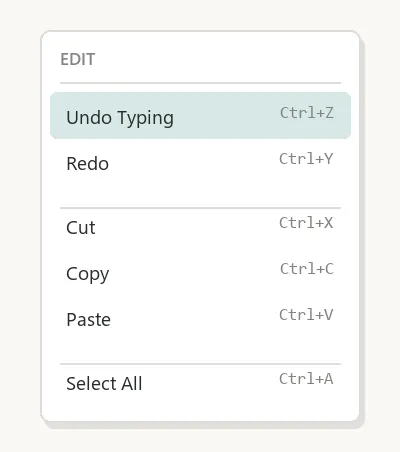 Not the most-used command in the menu — just the one customers need to reach for in a hurry, right when something just went wrong.
Linear vs. non-linear undo
Linear undo uses a simple last-in-first-out stack: only the single most recent action can be undone, then the one before it, strictly in reverse order. Non-linear undo lets a customer undo actions in an arbitrary order rather than only the most recent one, and breaks down further into named sub-models (script, undo/redo-and-selective, triadic, and selective-undo models) depending on exactly how much freedom the customer gets to pick which past action to reverse.
Linear undo uses a simple last-in-first-out stack: only the single most recent action can be undone, then the one before it, strictly in reverse order.
Two implementation approaches
Undo is typically built one of two ways: the Command pattern, where every action is encapsulated as an object with paired execute/un-execute operations, or the Memento pattern, where a separate object externally captures and restores an item’s internal state without the item itself needing to know its state is being saved. Multi-level undo needs some capacity limit in practice — Adobe Photoshop defaults to 20 stored actions (user-adjustable), and Microsoft Paint expanded from 3 to 50 starting with its Windows 7 version.
Redo, and what breaks it
Redo re-applies an action just undone, restoring the state a customer stepped back from. In the simplest flip undo model, a program has no separate redo command at all — undo itself is treated as an action that can be undone, so a customer flips back and forth between exactly two states. In fuller multi-level systems, making a new edit after an undo typically clears the redo history entirely, since the action that would be “redone” no longer follows from the document’s current state; some programs instead branch the history so the abandoned redo path isn’t lost outright, just set aside.
Redo re-applies an action just undone, restoring the state a customer stepped back from.
Related Concepts
Patterns
Principles
- Interface Design Principles
- Keyboard Shortcuts
- Modal vs. Modeless Interfaces
- Error Prevention and Recovery
Processes
Further reading
Bruce Tognazzini’s First Principles of Interaction Design (asktog.com — no stated open license) makes “Always allow Undo” one of its named principles, citing a Nielsen Norman Group e-commerce study: merchants who made it easy to remove items from a shopping cart saw no change in how often customers actually removed them, but customers added more items overall once removal felt safe and reversible.
Sources
Undo (Wikipedia) is this page’s sole source — the Macintosh-guidelines Undo-placement history, the linear-versus-non-linear undo taxonomy, the Command and Memento implementation patterns, the Photoshop/Paint capacity-limit examples, and the flip-undo-model description of redo.