
Filters and Facets
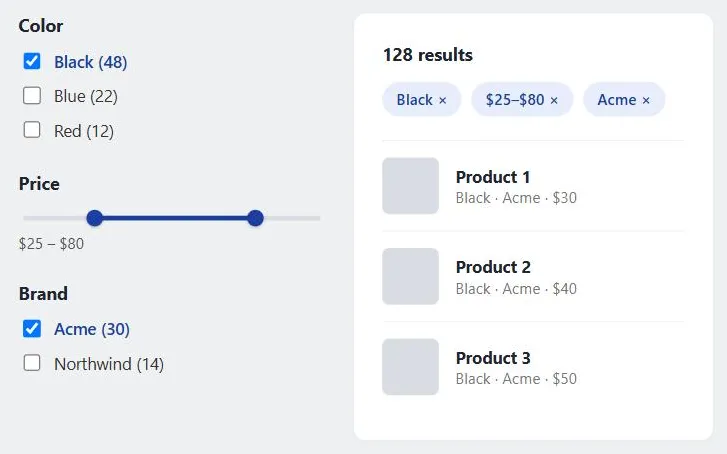 Filters show their consequences at both ends: result counts before a customer commits, and a visible, removable list of what’s applied afterward.
Background
Filters and facets sit alongside search results and category browsing as a third way of narrowing a large set — where search assumes the customer can name what they want and browsing assumes a fixed hierarchy, faceted filtering assumes the customer can recognize the right combination of attributes once they’re shown as options. A facet corresponds to a property of the items being browsed (color, format, date, author), letting the same set be accessed and ordered multiple ways instead of being locked into one predetermined order. More facets give customers more precise control but add visual complexity and decision load (see Content Organization Schemes for the same organize-vs-overwhelm tension in a browsing context), and facets only work if the underlying content is tagged accurately and consistently enough to support them — reliable tagging is a prerequisite, not a detail to fix later.
where search assumes the customer can name what they want and browsing assumes a fixed hierarchy, faceted filtering assumes the customer can recognize the right combination of attributes once they’re shown as options
Problem
A large result or listing set (search results, a product category, a document archive) is too big to scan as a flat list, but customers rarely want to browse it in only one dimension — they want to narrow by several independent attributes at once (price, brand, size, date, rating) in whatever order makes sense to them. The pattern spread fast once retailers recognized this: by 2014, roughly 40% of the fifty largest US-based online retailers had implemented faceted search, and library catalogs have followed the same path, letting patrons narrow a keyword search by format, date, or subject alongside it.
customers rarely want to browse it in only one dimension — they want to narrow by several independent attributes at once (price, brand, size, date, rating) in whatever order makes sense to them
Solution
Implement faceted filtering well by getting these details right.
Match the control to the attribute type
Checkboxes suit facets where several values can apply at once (a product available in multiple colors); radio buttons or a single-select dropdown suit mutually exclusive facets; a range slider or min/max input suits continuous values like price or date.
A multi-select facet, grouped so assistive technology announces the options as one set, with result counts in each label:
<fieldset>
  <legend>Color</legend>
  <label><input type="checkbox" name="color" value="black"> Black (12)</label>
  <label><input type="checkbox" name="color" value="red"> Red (8)</label>
  <label><input type="checkbox" name="color" value="blue"> Blue (5)</label>
</fieldset>
Show result counts per option before the customer commits
A facet value labeled “Red (12)” tells a customer what selecting it will do before they click it; an unlabeled checkbox forces a guess-and-check loop.
Never let a combination silently return zero results
Either hide or disable options that would produce an empty set given the customer’s current selections, or clearly explain why a combination has no matches — a blank results page with no explanation reads as broken, not as “no matches.”
a blank results page with no explanation reads as broken, not as “no matches.”
Make active filters visible and individually removable
Show applied filters as a persistent, labeled list (often “chips”) near the results, each with its own removal control — a customer who forgets they filtered by a narrow price range has no path back to full results without this.
Decide filter logic explicitly, and signal it
Filtering by two values within the same facet (e.g. two brands) is typically an OR (“either brand”); filtering across facets (brand and price) is typically an AND (“this brand and this price range”). Customers generally assume this default without being told, but an interface that departs from it — such as treating multiple selections within one facet as AND — needs to say so explicitly, since the assumption otherwise produces silently wrong results.
Don’t apply the same facet set to every content type
A one-size-fits-all filter panel forces categories that don’t share attributes (say, books and furniture) into filters that are irrelevant to one or the other. Build the facet set from what’s actually distinctive about each content type rather than reusing a single global list everywhere.
Related Concepts
Patterns
Principles
Further reading
Schade, Cheng, and Sherugar’s Top 10 Enduring Web-Design Mistakes (Nielsen Norman Group, 2016 — copyright NN/g, no open license; https://www.nngroup.com/articles/top-10-enduring/) names flawed filters and facets as one of ten recurring usability mistakes, including facets that don’t support the exclusion criteria customers actually want (e.g. selecting colors “other than blue”).
Yee, Swearingen, Li, and Hearst’s Faceted Metadata for Image Search and Browsing (CHI 2003 — copyright ACM, no open license; https://doi.org/10.1145/642611.642681) reports a controlled study where a hierarchical faceted-browsing interface was strongly preferred over standard keyword search despite responding an order of magnitude slower, and proposes a three-stage opening/middle-game/endgame model for how a facet search unfolds.
Sources
Faceted Search (Wikipedia) (CC BY-SA 4.0) backs the multi-dimensional facet definition above and supplies the 2014 retail-adoption figure and the library-OPAC example.