
Printable Pages
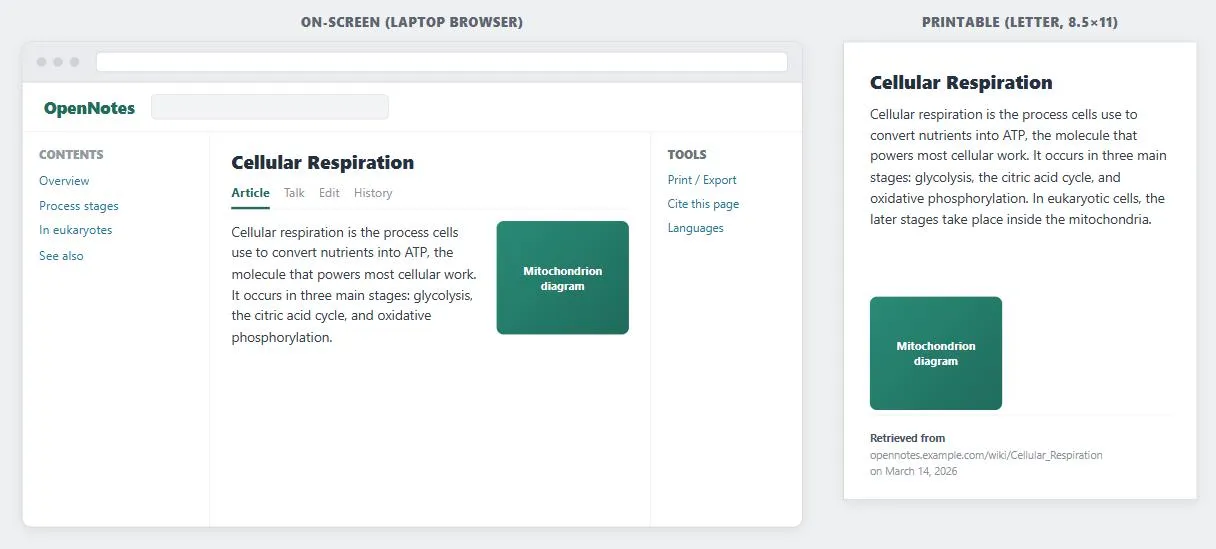 Modeled on Wikipedia’s own real print output (CC BY-SA): the Contents and Tools columns that only make sense on a wide screen are gone, and the one thing paper can’t supply on its own — where this came from — is written in instead.
Problem
Hitting a browser’s own Print button on an ordinary page frequently produces a bad result: content chopped off the edge of the paper, dozens of irrelevant pages of navigation and sidebar, or a document a customer can’t reasonably use.
Hitting a browser’s own Print button on an ordinary page frequently produces a bad result: content chopped off the edge of the paper, dozens of irrelevant pages of navigation and sidebar, or a document a customer can’t reasonably use.
Solution
The fix is not to redesign the on-screen page around printing — it’s to generate a separate, simplified page built specifically for the printer, reusing the same underlying content.
Build the printable version
Create a printer-friendly page template and load the original page’s content into it, rather than hand-editing each page’s markup for print. From that template, strip everything that has no printed-page purpose: frames, side-running navigation bars, and sidebars of related content. Where an article has been split across multiple pages for on-screen reading, join it back into one continuous document for the printable version — a customer printing an article wants the whole thing, not one fragment per sheet. Keep the main content out of HTML tables in the printable template specifically, since table-based layout is one of the most common sources of print-formatting breakage.
Label the output
Because a printed page loses its browser chrome (URL bar, page title), add the title, author, date, and source URL directly onto the printable page itself — otherwise a customer who prints an article has no way to find it again later.
a customer who prints an article has no way to find it again later.
Prioritize high-traffic pages for a dedicated printable version
Every page template class can benefit, but pages customers are most likely to want on paper — homepages, category pages, product detail pages, order-confirmation pages — are the highest-value candidates for a dedicated printable version. A well-structured printable page also improves Accessibility (a stripped-down, linear document is easier for assistive technology to navigate) and can help with search-engine crawling, since crawlers that struggle with frames or heavy navigation markup can more easily parse a simplified page.
pages customers are most likely to want on paper — homepages, category pages, product detail pages, order-confirmation pages — are the highest-value candidates for a dedicated printable version.
Related Concepts
Patterns
- Page Template
- Grid Layout
- Consistent Sidebars of Related Content
- Search Engine Optimization
- Category Pages
Principles
Sources
The Design of Sites: Pattern Group D — Writing and Managing Content (D8 Printable Pages) is this page’s sole source — the dedicated printer-friendly template approach, stripping frames/navigation/sidebars, rejoining multi-page articles for print, and labeling the output with title/author/date/URL all come directly from that pattern.