
Favicon
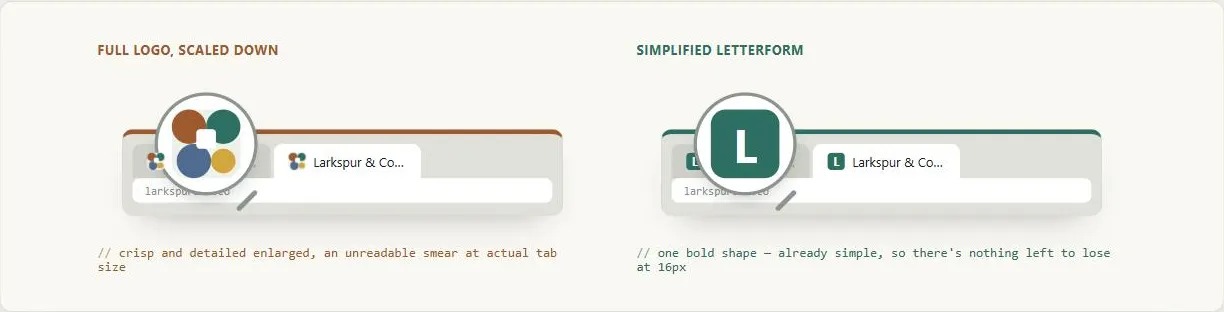 The magnifying glass shows what the designer approved; the tiny tab icon shows what the customer actually sees — a favicon only has to survive the second one.
Background
A favicon is a small icon associated with a website, displayed by browsers in tabs, bookmarks, address-bar dropdowns, and browser history lists. On mobile devices, it appears as the home-screen icon when a user saves a site to their home screen. Originally shown only for bookmarked sites, favicons are now displayed by all modern browsers on every page visit, whether or not the site is bookmarked.
Originally shown only for bookmarked sites, favicons are now displayed by all modern browsers on every page visit, whether or not the site is bookmarked.
Problem
A missing, broken, or illegible favicon is a minor but real cost, across four independent fronts:
- Brand recognition suffers, since at small sizes a favicon is often the only visual brand element visible while a tab is in the background.
- Credibility takes a hit too — a missing or broken favicon is a minor but noticeable sign of an unpolished or incomplete site, and a properly configured favicon is part of the baseline legitimacy floor that Trust and Credibility describes.
- There’s a performance cost even when nobody notices: all modern browsers automatically request
favicon.icofrom the site root on every page load regardless of whether the site declares one, so a missing favicon means an unnecessary 404 and server log noise on every single visit. - And favicons carry search engine optimization (SEO) value — they appear in Google search results (in the address line above the page title on mobile) and in browser history, reinforcing brand recognition at exactly the points where users decide whether to revisit a site (see Search Engine Optimization).
all modern browsers automatically request
favicon.icofrom the site root on every page load regardless of whether the site declares one, so a missing favicon means an unnecessary 404 and server log noise on every single visit.
Solution
Choose the right format and size for each context the favicon appears in, provide dedicated mobile home-screen icons, design deliberately for legibility at small sizes, and provide a root-directory fallback so the icon resolves even without explicit markup.
Choose formats and sizes
The original format was ICO (.ico), required by Internet Explorer 5–10. Modern browsers support PNG, JPEG, GIF, APNG, and SVG, with ICO support universal across all browsers. PNG is the practical modern default; SVG is supported by all major browsers except Internet Explorer and is the best choice for new sites because it scales cleanly to any size from a single file.
Standard sizes:
| Context | Size |
|---|---|
| Browser tab | 16×16 px |
| Bookmark / taskbar | 32×32 px |
| Desktop shortcut | 48×48 px |
| iPhone home screen | 180×180 px |
| iPad home screen | 167×167 px |
| Android home screen | 192×192 px |
ICO files can bundle multiple sizes in one file, so older sites often used a single .ico containing 16×16, 32×32, and 48×48 variants.
Provide mobile home-screen icons
When users save a site to their device home screen, the favicon becomes a full app icon:
- iOS: provide
<link rel="apple-touch-icon">in the<head>. Without it, iOS uses a screenshot of the page as the icon. iOS rounds the corners automatically; sizes: 180×180 (iPhone), 167×167 (iPad). - Android: provide a
<link rel="icon">with asizesattribute, or a Web Manifest JSON file declaring icon paths and sizes. Recommended: 192×192 minimum, 512×512 for high-resolution splash screens.
Ensure legibility at 16×16
Ensuring legibility at 16×16 is the primary constraint. A favicon that works at 32×32 may become an unrecognizable smear at 16×16. Common approaches: use a letterform from the brand wordmark, a simplified version of the logo mark, or a distinct symbol — never a scaled-down version of the full logo. Test by actually resizing the candidate image to 16×16 and viewing it at 100%.
A favicon that works at 32×32 may become an unrecognizable smear at 16×16.
Use SVG to support dark-mode-aware favicons
An SVG favicon can also support dark-mode variants via CSS prefers-color-scheme media queries — the favicon can invert or change color to remain visible against both light and dark browser chrome. Because an SVG carries its own <style> block, the light-theme colors can be the icon’s default styling, with a dark-theme palette inside a media query in the same file: no script, and no second image. The adaptation doesn’t have to be a full inversion. Darkening a bright outline and softening a white fill is often enough, while a brand accent color can stay the same in both themes.
Add the SVG as progressive enhancement over the .ico, not a replacement for it: declare the .ico first and the SVG after it, so a browser that can use the SVG does, and every other browser still gets an icon.
<link rel="icon" href="/favicon.ico" sizes="any">
<link rel="icon" href="/favicon.svg" type="image/svg+xml">
Since the SVG can look identical to the .ico in a light-themed browser, confirm in the browser’s developer tools (the Network panel, filtered to images) that the SVG is the file actually loading.
Avoid mimicking browser UI elements
Don’t design a favicon that looks like part of the browser itself. A padlock icon, for example, sits near the browser’s security indicator in the tab bar and can mislead users about connection security. This is both a UX failure and an active phishing vector.
Provide a root-directory fallback
Placing a favicon.ico file at https://example.com/favicon.ico allows browsers to find it automatically without any HTML declaration. This serves as a reliable fallback but should not replace explicit <link rel="icon"> tags, which allow format control (SVG, PNG), multiple size declarations, and mobile-specific icons.
Related Concepts
Patterns
Principles
Sources
Favicon (Wikipedia) (CC BY-SA) is the source for the standard size table, format guidance (ICO/PNG/SVG), mobile home-screen icon requirements, and the padlock-mimicry phishing caution above.
web.dev: Building an Adaptive Favicon (CC BY 4.0) is the source for the embedded-style technique behind a dark-mode-aware SVG favicon, declaring the SVG after the .ico as progressive enhancement, and checking the Network panel to confirm the SVG is the file actually loading.