
Page Not Found
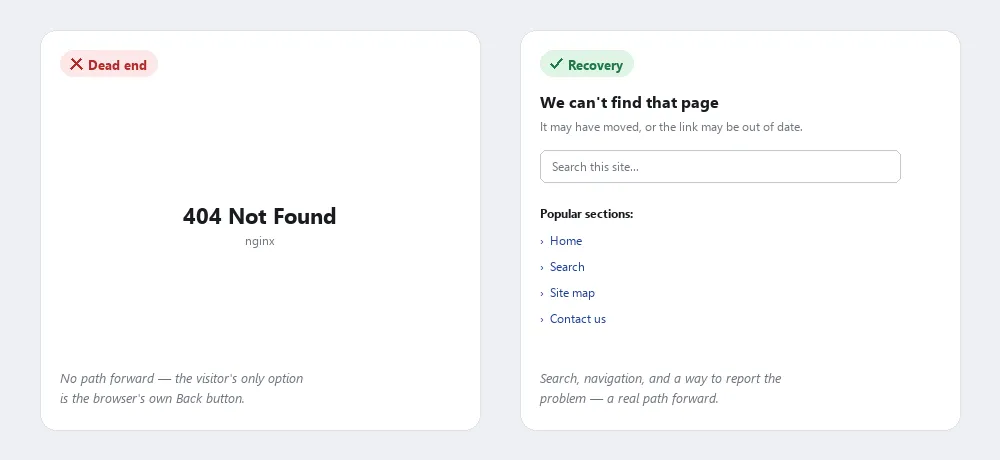 The left offers nothing but Back; the right offers a search box and four places to go instead.
Background
A well-designed Page Not Found page is compensation for a navigation failure that’s already happened — it doesn’t prevent broken links, it only limits the damage. Stable Permalinks and disciplined redirect-on-move practices are what actually keep customers from hitting this page in the first place; the custom error page is the safety net for when they do anyway.
A well-designed Page Not Found page is compensation for a navigation failure that’s already happened — it doesn’t prevent broken links, it only limits the damage.
Problem
As a site evolves, pages move or disappear, and customers inevitably follow a stale link, a bad bookmark, or a mistyped URL into a dead end — the generic “404” error a Web server shows by default gives them nothing to do next.
the generic “404” error a Web server shows by default gives them nothing to do next.
Solution
Design a custom error page that helps people continue
Replace the default error page with a custom one that treats the moment as a recovery opportunity rather than a dead end:
- State plainly that the page couldn’t be found, in the same tone and design as the rest of the site, so the page doesn’t read as a broken or abandoned corner of it.
- Give the customer a way to keep going: a search box, a navigation bar to the site’s main sections, and, on larger sites, relevant portions of the Site Map (Navigation Page) so the customer can see the site’s overall structure rather than guessing where to go next.
- Provide a way to report the problem — a contact link for whoever maintains the site — so customers who found a genuinely broken internal link can flag it.
State plainly that the page couldn’t be found, in the same tone and design as the rest of the site, so the page doesn’t read as a broken or abandoned corner of it.
Find and fix the source
Check server logs for where “page not found” errors are actually occurring. If a disproportionate number trace back to a specific referring site, contact whoever maintains that site and ask them to update the stale link. For a page that’s been deliberately moved rather than removed, redirect the old URL to the new location — a server-side redirect is preferable, but where that’s not available, an HTML <meta http-equiv="Refresh"> tag pointing to the new URL is a working fallback.
Related Concepts
Patterns
- Navigation Menus
- Search Action Module
- Site Map (Navigation Page)
- Permalinks
- Form Design
- Frequently Asked Questions
Sources
The Design of Sites: Pattern Group K — Making Navigation Easy is this page’s source — Pattern K14, covering the custom-404-as-recovery-opportunity approach (plain statement of the problem, a search box and navigation bar to keep going, a way to report the broken link) and the log-file-driven redirect fix for pages that moved rather than disappeared.