
Frequently Asked Questions
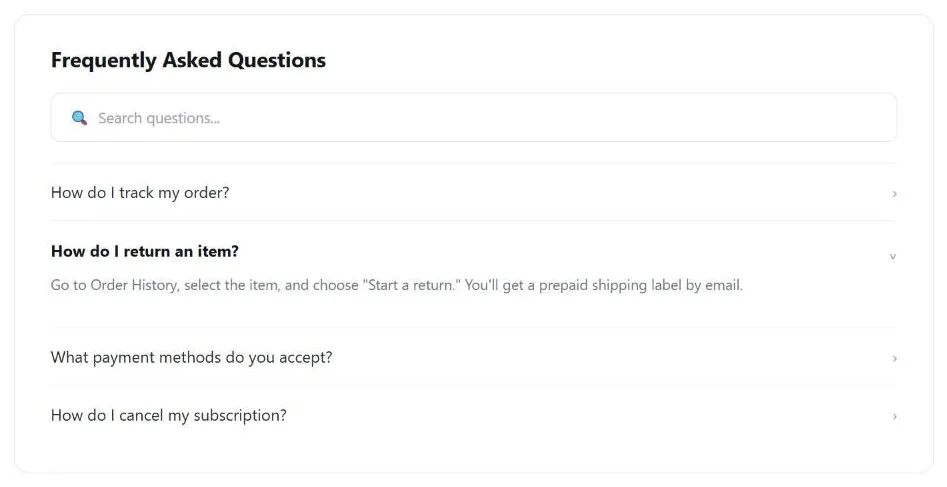 A search box for the long tail of questions, and answers a click away rather than a page-long scroll — the same page works whether a customer has 10 questions or 200.
Background
Use a FAQ page alongside Context-Sensitive Help rather than instead of it — context-sensitive help answers a question at the exact point of need, while a FAQ page is the fallback for the questions that don’t map neatly to one specific spot on the page.
context-sensitive help answers a question at the exact point of need, while a FAQ page is the fallback for the questions that don’t map neatly to one specific spot on the page
Problem
Different customers on the same site tend to ask the same handful of questions, over and over, and answering each one individually (by phone, by email) is expensive and slow.
Solution
A FAQ page — a curated list of common questions and their answers — lets customers help themselves, cutting support cost and response time at once.
Gather the questions
Start with the design team itself: get people from business, marketing, design, usability, and engineering to brainstorm a first list, written from the customer’s point of view rather than the company’s internal structure. Then widen the net:
- Check competitors’ FAQ pages — which of their questions apply to your site too, and do they answer them better than your current draft does? Borrow the questions, never the answers.
- Ask people in direct contact with customers — usability-test facilitators (see Usability Evaluation Methods) and support/sales staff can supply real questions and real points of confusion observed firsthand, plus whatever a help desk’s own call/email logs already capture repeatedly.
Borrow the questions, never the answers.
Organize and place the page
If there are more than roughly 20 questions, apply one of the standard organization schemes (hierarchical or popularity-based, e.g. a “top ten” list, are the most common fits for FAQ content) rather than one long undifferentiated list; below that threshold, a single page with questions linked to answers below works fine. For a long list, add a search box so customers aren’t stuck browsing.
Make the page easy to find through redundant navigation — a link from primary navigation (labeled “FAQ” or “Help”), the site footer‘s own help-and-support link, and links from the About Us page and a Page Not Found page. Where a specific question is especially relevant to a specific task (shipping-policy questions during checkout, for instance), link directly to that question from the task itself rather than making customers hunt for it on the FAQ page — the same task-based access pattern used in Account Management.
What a FAQ page is (and isn’t) for
Treat the FAQ page as a redundant, secondary aid — not a substitute for fixing an underlying usability problem. If customers repeatedly ask the same question, that’s a signal the interface itself should answer it without requiring a detour to a help page; the FAQ is a stopgap, not the fix. If questions are individually linked (rather than all shown on one page), server-log analysis of which questions get clicked most is a useful signal for prioritizing what to fix in the actual interface.
If customers repeatedly ask the same question, that’s a signal the interface itself should answer it without requiring a detour to a help page; the FAQ is a stopgap, not the fix.
Let the community maintain the FAQ
On a community site, a FAQ page can become a genuine community-building artifact: a few motivated members write the first version, post it, and iteratively fold in comments, corrections, and new questions from the wider community, crediting contributors along the way.
Related Concepts
Patterns
- Context-Sensitive Help
- Content Organization Schemes
- Search Action Module
- Site Header
- Site Footer
- About Us Pages
- Page Template
- Page Not Found
- Easy Returns
- Email Communications
- Floating Windows
Processes
Sources
The Design of Sites: Pattern Group H — Helping Customers Complete Tasks is this page’s source — its H7 Frequently Asked Questions pattern supplies the question-gathering process (design-team brainstorm, competitor FAQs, support-staff input), the roughly-20-question organizing threshold, and the redundant-navigation and community-maintenance guidance above.