
External Links
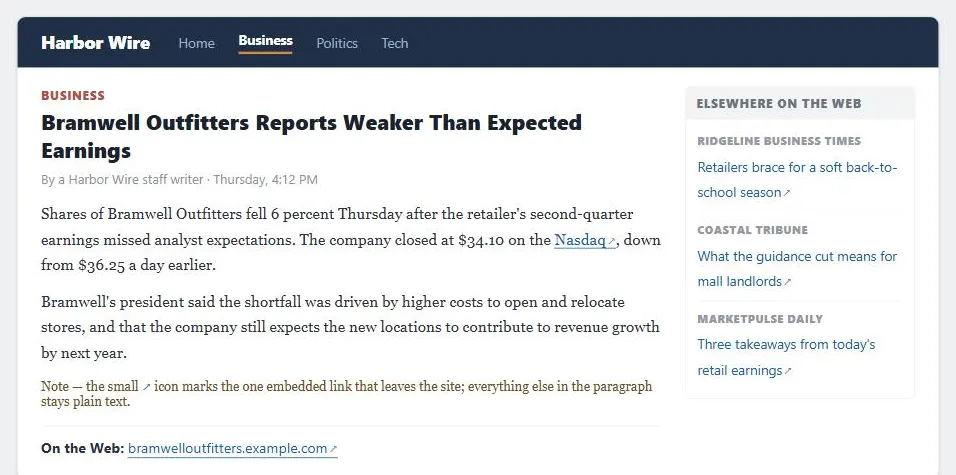 Three ways of setting the same expectation — a marked link mid-sentence, a marked citation at the bottom, and a whole module labeled for links that lead away — all using the same icon so a reader learns it once.
Background
External links to partner sites, press coverage, complementary products, or independent reviews build trust and credibility — a site willing to point outside itself for good information reads as more credible than one that only ever references its own pages.
External links to partner sites, press coverage, complementary products, or independent reviews build trust and credibility — a site willing to point outside itself for good information reads as more credible than one that only ever references its own pages.
Problem
Customers can’t always tell, before clicking, whether a link stays on the current site or leaves it. Site owners are right to worry that a poorly-marked external link will lose a visitor who didn’t mean to leave, or that the destination page will move or disappear later (link rot), silently turning a useful reference into a dead end.
Site owners are right to worry that a poorly-marked external link will lose a visitor who didn’t mean to leave, or that the destination page will move or disappear later (link rot), silently turning a useful reference into a dead end.
Solution
Mark external links clearly so customers aren’t surprised to leave the site, take deliberate steps to minimize link rot, and open a new window only when a customer is genuinely mid-task and shouldn’t lose their place — the specific techniques below.
Minimize link rot
Three complementary defenses, in increasing order of effort:
- Periodically check outbound links with a link-checking tool, since a destination can change or disappear at any time without notice. A link check should catch more than outright dead (404) destinations: an empty
hrefproduces a link that silently does nothing when clicked, and a malformedhref— often just a typo — can point somewhere unintended without ever registering as “broken” to a simple liveness check. - Prefer linking to a permalink on the destination site where one is available — a URL the destination owner has committed to keeping stable is far less likely to rot than an arbitrary or session-specific one.
- Ask the destination site for permission to link. Beyond the goodwill, this opens a direct channel: the destination operator can tell you their own URL-stability conventions, may agree to link back, and is more likely to give notice before restructuring URLs your site depends on.
Set expectations before the click
Mark external links so customers aren’t surprised to leave the site — a visible label (“[external]”), a distinct icon, or grouping external references into their own clearly-titled area of the page (a “Related Links” module, or a dedicated section at the end of an article, as some news sites do). One workable pattern, used by some news sites, is to route in-text embedded links to a labeled external-links section at the bottom of the same page, rather than sending the reader off-site directly from the body text — this keeps all outbound destinations visible and clearly marked in one place while still crediting the specific claim they support.
Open a new window
Opening an external link in a new window or tab preserves the customer’s place in the current site — most useful when the customer is mid-task and shouldn’t lose their position. This isn’t free: too many open windows becomes its own source of confusion, and most external links aren’t encountered mid-task, so this should be the exception rather than the default treatment for every outbound link. See Floating Windows for the related caution against overusing pop-ups generally.
Opening an external link in a new window or tab preserves the customer’s place in the current site — most useful when the customer is mid-task and shouldn’t lose their position.
Related Concepts
Patterns
- Embedded Links
- Permalinks
- Floating Windows
- Content Organization Schemes
- News Mosaics
- Grassroots Information Sites
Principles
Further reading
The W3C’s “G201: Giving users advanced warning when opening a new window” (W3C Document License, permits copying but not derivative works) gives Open a new window a formal accessibility basis: a WCAG technique for telling users in the link itself, before they click, that it will open a new window or tab.
Sources
The Design of Sites: Pattern Group K — Making Navigation Easy is this page’s K8 External Links pattern source — minimizing link rot via permalinks and destination-site permission, marking links before the click, and opening a new window only when a customer is mid-task.