
Multiple Destinations
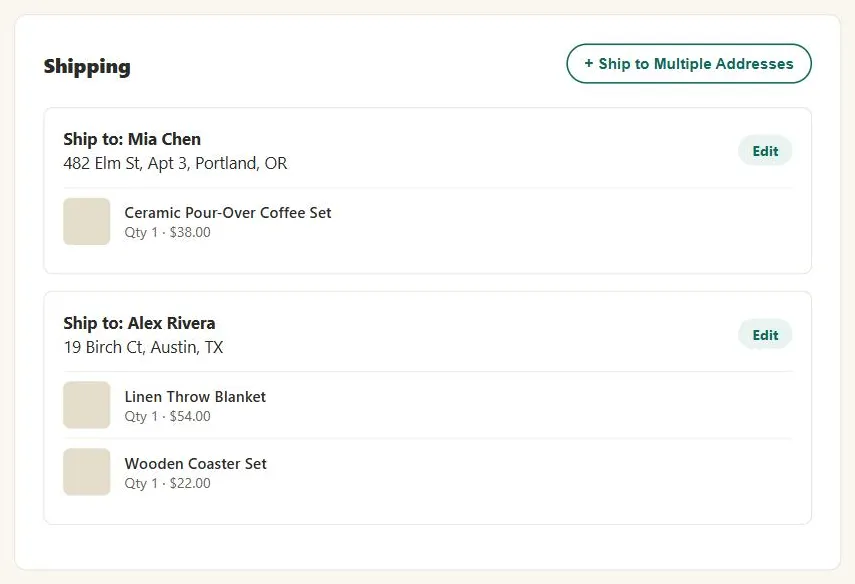 Splitting the order isn’t the hard part — keeping each destination’s own items easy to review and edit afterward is.
Background
This pattern depends on a working single-address checkout already being in place — see Quick-Flow Checkout for the full basic checkout flow — it only adds the branching needed when one order has to split across recipients, not the checkout flow itself. It introduces no trade-off of its own beyond what process funnels generally face: every extra address a customer assigns multiplies the number of things that can be wrong in the final review step, which is why a clear, destination-grouped summary matters more here than in a single-address checkout.
every extra address a customer assigns multiplies the number of things that can be wrong in the final review step, which is why a clear, destination-grouped summary matters more here than in a single-address checkout.
Problem
Customers buying gifts for several people in one order need to ship different items to different addresses, but a standard single-address checkout has no way to express that.
Customers buying gifts for several people in one order need to ship different items to different addresses, but a standard single-address checkout has no way to express that.
Solution
Offer the option explicitly during checkout
Via a “Ship to Multiple Addresses” action button at the point where the customer would otherwise enter one shipping address.
Reuse the existing address book
For returning customers, show a pick list of previously-used addresses next to each product in the order, rather than asking them to re-enter destinations from scratch; first-time customers (with an empty address book) go straight to an address-entry form instead.
Group the order summary by destination, not just by product
So customers can verify each address’s contents are correct before confirming — with an Edit action button on each address group, so a mistake doesn’t require restarting the whole order. Carry the same per-destination grouping into the printable confirmation page.
So customers can verify each address’s contents are correct before confirming — with an Edit action button on each address group, so a mistake doesn’t require restarting the whole order.
Related Concepts
Patterns
- Gift Giving
- Process Funnel
- Quick-Flow Checkout
- Action Buttons
- Grid Layout
- Order Tracking and History
Sources
The Design of Sites: Pattern Group G — Advanced E-Commerce is this page’s sole source, its G5 pattern — shipping different items in one order to different addresses via an explicit “Ship to Multiple Addresses” action and a destination-grouped order summary.