
Voice User Interface
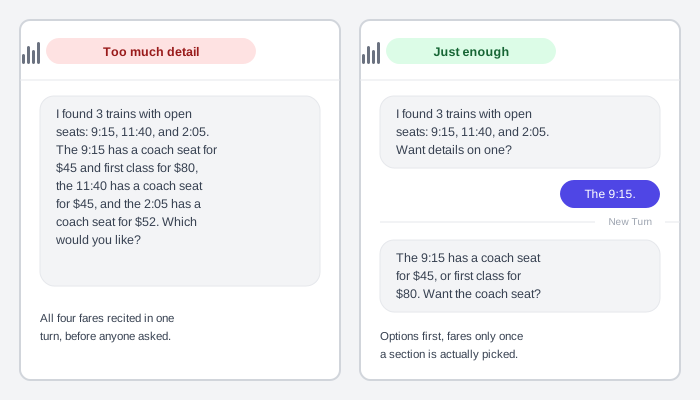 Splitting the same information across two short turns, rather than one long one, is what actually makes it easier to follow — not shorter sentences alone.
Background
Voice-first interaction — talking to an AI assistant instead of tapping through screens — has none of a graphical interface’s usual toolkit: no persistent screen to scan, no visible menu to browse, nothing to point at. Even text-based AI chat still shows a scrollable message history and clickable controls; a spoken exchange has neither. The logic that works for a graphical interface is almost never going to work as-is for a conversational one, so its conventions have to come from somewhere else — the turn-taking and repair patterns of ordinary human conversation.
Voice-first interaction — talking to an AI assistant instead of tapping through screens — has none of a graphical interface’s usual toolkit: no persistent screen to scan, no visible menu to browse, nothing to point at.
Problem
A voice interface can’t rely on any of a screen’s usual affordances — a visible menu to browse, a highlighted field to point at when something goes wrong, a persistent record of what was already said — so a design built around tapping and looking has nothing to fall back on the moment it’s driven by voice alone.
Solution
Borrow the structure of the pattern from ordinary human conversation — how people take turns, confirm what they heard, and recover from a misunderstanding — rather than reusing graphical-interface conventions that assume a screen.
Confirm voice is the right modality
Voice interaction design starts from the patterns of human conversation itself, not from adapting an existing graphical flow — a screen’s logic and a spoken exchange’s logic rarely transfer directly. Give the assistant its own persona: specific enough to have a recognizable voice and personality, but brief enough to stay in mind while writing every line of its dialogue.
Let turn-taking cues do the work a visible cursor can’t
Signal a turn is finished by asking a question, and ask only one at a time — an interface that keeps talking past its own question, or asks two things at once, gives a person nothing clear to respond to. Ordinary human conversation completes a turn in about two seconds with only 200 milliseconds between speakers, a gap so tight across cultures and even sign language that people are clearly predicting when a turn will end rather than just reacting to silence. Match that same economy: end each turn as soon as the question is asked, and don’t ask for information a person has already volunteered.
Ordinary human conversation completes a turn in about two seconds with only 200 milliseconds between speakers, a gap so tight across cultures and even sign language that people are clearly predicting when a turn will end rather than just reacting to silence.
Help people discover what to say without a visible menu
A voice interface can’t fall back on a menu bar to show what it can do, so discoverability has to be designed deliberately: choose a name that reflects the assistant’s persona and is easy to pronounce and recognize; write invocation phrases that name a specific capability rather than a generic one, since a vague phrase gives a person nothing to repeat back; and vary a greeting’s specificity to match how it was reached — a deep link earns a greeting naming the exact task, a general entry point a broader one.
Write for the ear, not the eye
Spoken language reads differently once it’s heard rather than read: keep responses concise so a person can take their turn quickly, use plain everyday words over technical terminology, and vary a repeated response the way a person naturally would rather than replaying identical phrasing every time. Use contractions (“can’t” rather than “cannot”) and lead a request with the reason before asking, the same way a person would explain themselves in conversation. Favor action-oriented phrasing (pick, select, choose) over device-specific verbs (tap, swipe) that assume a screen a voice-only device might not have.
Confirm before acting, calibrated to what’s being confirmed
Confirm two different things — the parameters a person supplied and the action about to happen — and choose how firmly to confirm each based on what’s actually at stake, not one fixed rule for every confirmation. Restate an understood parameter routinely without waiting for a reply (implicit confirmation), since a person needs that restated detail to make sense of what happens next; acknowledge a completed action the same way, unless the response itself already makes it obvious. Reserve an explicit yes/no confirmation — one that blocks progress until a person actually responds — for the rare case where getting it wrong is costly: a transaction, a deletion, an address read back before something ships to it.
Recover from a misunderstanding without anything to point at
A voice interface has no invalid field to highlight, so error recovery depends entirely on what’s said next — the same underlying goal as Error Messages‘s written-interface guidance, applied where there’s no field to place a message next to. When the system doesn’t understand an answer, ask again in different words rather than repeating the same prompt verbatim, since a verbatim repeat reads as robotic.
If a second attempt also fails, escalate: offer concrete examples or a narrower set of options instead of open-ended phrasing, since an example gives a person an implicit model of what to say without a long explanation — then end the exchange after two failed attempts rather than pushing for a third. Treat silence as a sign a person didn’t hear the question, not that they ignored it, and rephrase rather than repeat. When the system itself fails rather than misunderstanding a person, say plainly what went wrong without getting technical, and name a concrete next step.
Use a short audio cue only when its meaning is obvious without teaching it
A brief, non-verbal sound — an earcon — can signal something faster than a spoken phrase, but only once a person already knows what it means. Keep a small, easily-distinguished set, used consistently enough that a person picks up each one’s meaning without being told, and matched to the assistant’s own persona and brand so the set feels cohesive rather than generic. The moment an earcon can’t be understood without an explanation, drop it — conversation itself already works intuitively, and forcing a person to learn and remember a sound’s meaning adds exactly the burden earcons are supposed to remove.
The moment an earcon can’t be understood without an explanation, drop it — conversation itself already works intuitively, and forcing a person to learn and remember a sound’s meaning adds exactly the burden earcons are supposed to remove.
Fall back to a screen only where it genuinely helps
Design the spoken exchange first, for a screenless device, before adding anything visual — a visual component should supplement an already-working conversation, not carry weight the conversation itself should. Add one only where it clearly helps: an image a person would otherwise have to picture, a list too long to hold in working memory, a table of genuinely tabular data. A visual never replaces the spoken or on-screen text prompt it accompanies, and pairs with tappable suggestions so a touchscreen doesn’t strand a person with speech as their only option.
Related Concepts
Patterns
Sources
Google Conversation Design Guide (Assistant Actions) is this page’s sole source — its conversation-design framing, turn-taking research, discovery pathways, spoken-language style rules, confirmation-calibration framework, error-recovery escalation, earcon guidance, and visual-component fallback rules all come from Google’s Conversation Design guide for Assistant Actions.