
Embedded Links
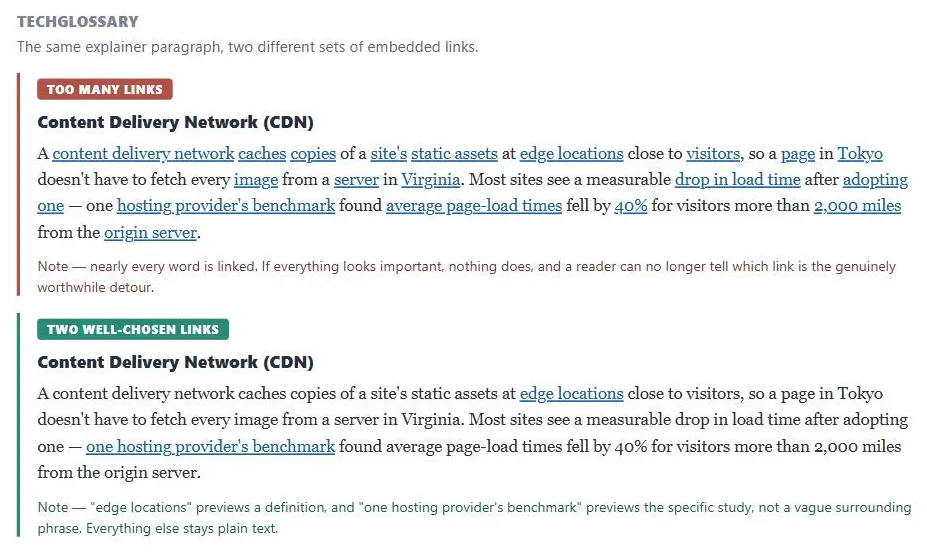 Same paragraph, same facts — one version buries the two links actually worth following under a wall of blue, the other lets them stand out.
Background
Links to other domains found among embedded links are a specific case of External Links, which covers marking and grouping conventions for links that leave the current site. Embedded links serve exploration well but cost coherence — a reader who follows one may never return to finish the original page. Balancing how many to include, and which ones warrant a full page navigation versus a lighter-weight floating window, is the core judgment call this pattern requires.
Embedded links serve exploration well but cost coherence — a reader who follows one may never return to finish the original page.
Problem
A reader mid-paragraph sometimes wants to go deeper on a term or claim, or needs a definition, without hunting for a separate “related links” section elsewhere on the page.
Solution
Place hyperlinks directly inside body text, at the point where the linked concept is mentioned, so readers can follow their curiosity exactly where it arises. Embedded links double as a skimming aid — since they visually stand out from surrounding text (see obvious links), a reader scanning a page notices them even without reading every word around them.
Embedded links double as a skimming aid — since they visually stand out from surrounding text (see obvious links), a reader scanning a page notices them even without reading every word around them.
Write link text that previews the destination
The words chosen for the link itself change what a reader expects: linking the survey’s own name (“a recent Web usability survey”) signals a direct link to the survey; linking a broader phrase around it signals a link to commentary or an article about the survey; linking a specific claim from it signals a link to that particular finding or a summary. See Browsable Content for the general case of writing link text that previews its destination.
Keep the number of embedded links low
A paragraph where nearly every word is linked reads as cluttered and defeats its own purpose — if everything looks important, nothing does. Reserve embedded links for genuinely worthwhile detours, not every possible tangent.
A paragraph where nearly every word is linked reads as cluttered and defeats its own purpose — if everything looks important, nothing does.
Consider opening some embedded links in a floating window
Rather than navigating away outright — useful when the linked material is a short aside (a definition, a footnote) or when the reader is in the middle of a process funnel and shouldn’t be pulled out of it. See Floating Windows for the tradeoffs of this technique, including the caution against opening too many windows at once.
Related Concepts
Patterns
Principles
Sources
The Design of Sites: Pattern Group K — Making Navigation Easy is this page’s K7 Embedded Links pattern source — writing link text that previews its destination, keeping the number of links low, and opening some links in a floating window instead of navigating away.