
Message Boards
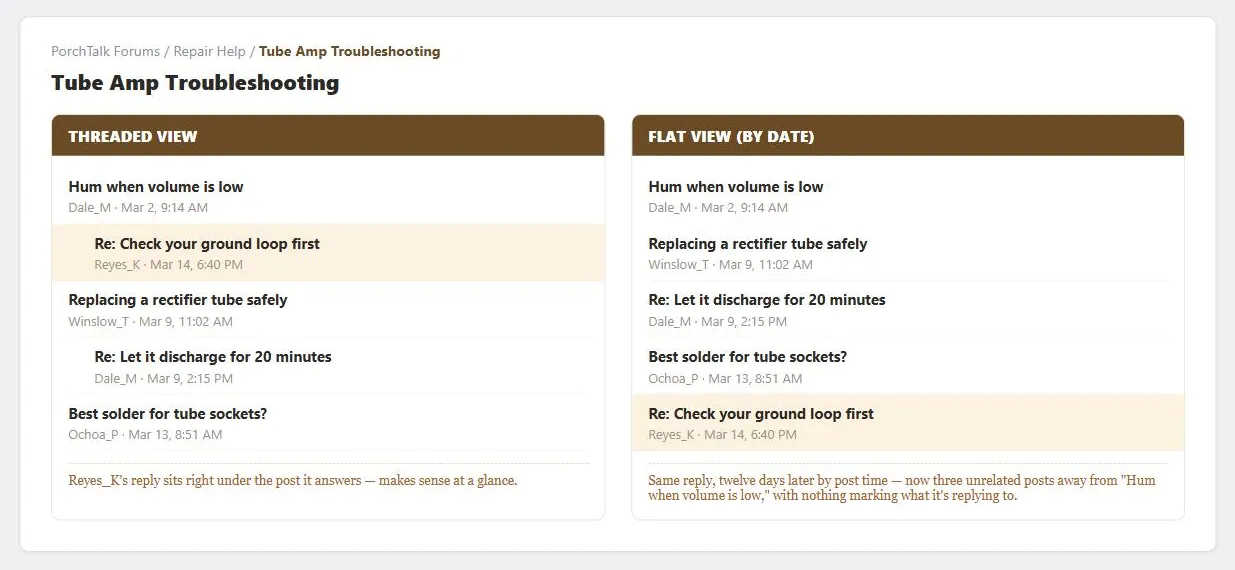 Same reply, same board, two views — threaded keeps it legible; flat by date buries it three posts away from what it’s actually answering.
Problem
Message boards only build a healthy community if they’re easy to find and use, but keeping them from becoming unruly requires real administrative tooling and ongoing moderation effort — a purely hands-off board tends to decay faster than one with some minimal governance.
Message boards only build a healthy community if they’re easy to find and use, but keeping them from becoming unruly requires real administrative tooling and ongoing moderation effort — a purely hands-off board tends to decay faster than one with some minimal governance.
Solution
Message boards let visitors post and read messages within topic-organized areas, forming the basis for online communities. The same posting/searching/reading mechanics underlie the community conference site genre, and, applied to e-commerce, recommendation communities (customer reviews are structurally a message board scoped to one product). Blogs, nonprofit, and educational sites all build on the same mechanics for their own comment/discussion sections, and Location-Based Services can attach the same mechanics to a physical place instead of a topic — a board scoped to “here” rather than to a subject.
Decide anonymity and moderation separately
Whether to allow anonymous posting and whether to moderate are two independent choices, not one — see Community Conference‘s “Set an anonymity level” and “Set a moderation level” for the tradeoffs behind each. The mechanical consequence follows directly from the moderation choice: both moderated and unmoderated boards need tools to delete messages, but only moderated boards additionally need a pre-publish review queue.
The mechanical consequence follows directly from the moderation choice: both moderated and unmoderated boards need tools to delete messages, but only moderated boards additionally need a pre-publish review queue.
Make boards findable and usable
Boards should sit inside the site’s normal navigation and content structure rather than a separate, harder-to-find area — cross-link them from the same sidebars used for other related content, and let signed-in customers save a list of favorite boards through Account Management. Give board pages location breadcrumbs and distinctive titles (see Search Engine Optimization) so they can be meaningfully bookmarked. Within a board, support keyword search via a search action module, a chronological filter for finding the newest posts, and — for high-traffic boards — a popularity sort. A threaded view (replies nested under the message they respond to) lets readers follow a single conversation far faster than an unthreaded, flat list; an alphabetical sort by author is a useful complement for finding a specific person’s posts. Offering both a threaded and a flat chronological view of the same board is a real hazard, not just extra convenience. A reply posted from the threaded view can attach to an old message buried deep in the conversation, and that reply then surfaces out of order to someone reading the same board in flat mode, confusing anyone not also seeing the thread structure.
Offering both a threaded and a flat chronological view of the same board is a real hazard, not just extra convenience.
Decide when to require sign-in
Three common policies, in increasing order of friction: let anyone read and post without an account; let anyone read but require sign-in before posting (so newcomers can “lurk” and evaluate the community before committing); or require sign-in even to read. The stricter the requirement, the more it discourages casual participation — reserve full sign-in-to-read for communities where identity verification (occasionally down to a credit card, for age or identity confirmation) is a genuine requirement of the content, not a default.
Set expectations for new posters
State the board’s rules before someone posts, not after — whether the board is moderated, what content will get a poster banned or reported (illegal, hateful, threatening, or copyrighted material, spam), whether links or images are allowed, and how long posts persist. Beyond formal rules, lightweight social-norm cues (pinned “sticky” posts collecting FAQs, posted posting tips) help newcomers avoid the friction of an experienced community reacting badly to an unfamiliar new poster. A higher barrier to entry for first-time posters — a small account-creation fee, or a delay before a new account can post — trades away some participant volume for higher average post quality; which side of that trade to take depends on how much the specific community is at risk from bad-faith posting.
Support core posting mechanics
Provide clear post/reply actions on every message (see Action Buttons), keep the message being replied to visible alongside the reply form, auto-populate a reply’s title from the original (prefixed “Re:”) while letting the poster edit it, and offer a preview step before final submission — essential once the board allows embedded links or HTML, so posters can verify how their formatting will actually render.
Provide administrative tooling
Moderators need a distinct, sign-in-gated view that lists new posts chronologically with accept/reject actions, plus the ability to remove any already-published post. Collecting information about members for moderation or legal-compliance purposes brings Fair Information Practices and the site’s Privacy Policy into play — the rules a board enforces, and what’s tracked to enforce them, need to be disclosed, not just applied silently.
At larger scale, add a second layer of meta-moderation: let ordinary members rate whether a specific moderation decision, not the underlying post, was fair. This spreads moderation judgment across the community instead of concentrating it in a small admin team nobody else can check, catching an individual moderator’s bias or error without requiring a human editor to review every single decision.
Related Concepts
Patterns
- Recommendation Community
- Account Management
- Sign-In and Account Creation
- Action Buttons
- Search Action Module
- Content Organization Schemes
- Breadcrumb Navigation
- Search Engine Optimization
- Privacy Policy
- Community Conference
- Blogs
- Nonprofits as Networks of Help
- Educational Forums
- Embedded Links
- Location-Based Services
- Consistent Sidebars of Related Content
Standards
Sources
The Design of Sites: Pattern Group D — Writing and Managing Content is this page’s primary pattern source (D5) — the anonymity-vs-moderation independent-decision framework, findability guidance (sidebars, breadcrumbs, bookmarkable titles), sign-in policy tiers, and the core posting and administrative-tooling mechanics.
The Design of Sites: Pattern Group A — Site Genres supplies the cross-genre framing in the Solution section’s opening — that the same posting/reading mechanics underlie community conferences, recommendation communities, and blogs, nonprofit, and educational sites, drawn from those genres’ own A3/A5/A6/A8/A12 patterns.
The Design of Sites: Pattern Group M — The Mobile Web is the source for treating Location-Based Services as the same message-board mechanics scoped to a physical place instead of a topic, from its M3 pattern.
Meta-moderation system (Wikipedia) is the source for the meta-moderation subsection — a second layer where ordinary members rate whether a specific moderation decision was fair, catching an individual moderator’s bias without requiring a human to review every decision.
Thread (online communication) (Wikipedia) is the source for the threaded-vs-flat-view distinction and the specific hazard of offering both on the same board — a reply attached in the threaded view surfacing out of order to someone reading in flat mode.