
Preventing Phishing Scams
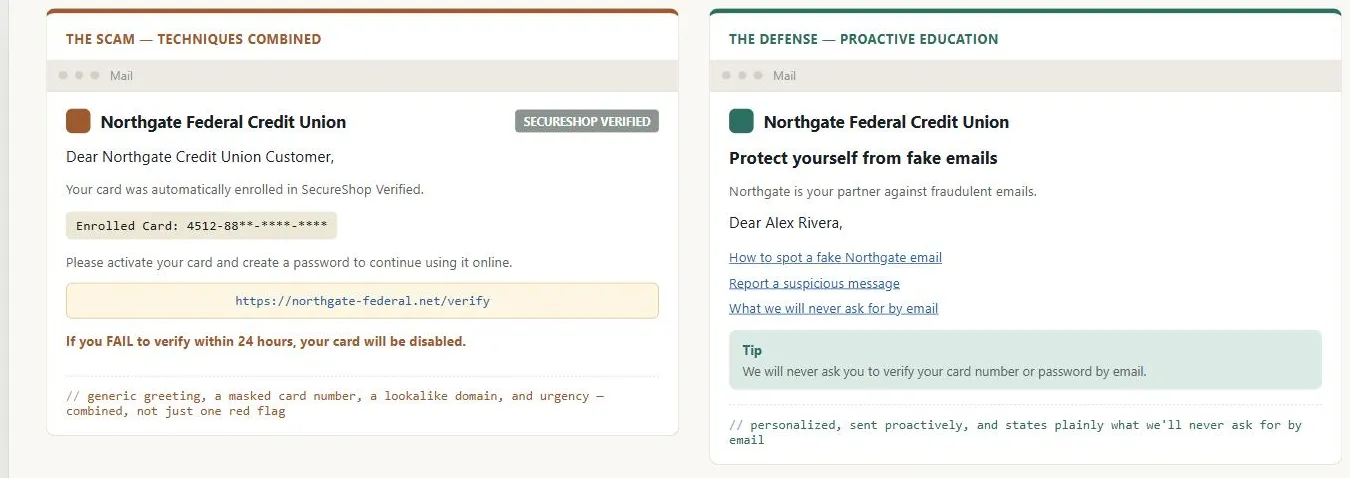 Borrowing a logo and a lookalike domain is all the scam needs to look real; the defense only works if the customer already knew, before either email showed up, what a real message from the credit union looks like.
Background
Education alone doesn’t close the gap, because some fraction of customers will always be fooled regardless of how well a site trains them — the strongest designs pair customer education with defenses (transaction limits, layered verification, prompt notifications) that cap the damage even after a customer has already been compromised.
the strongest designs pair customer education with defenses (transaction limits, layered verification, prompt notifications) that cap the damage even after a customer has already been compromised.
Problem
Phishing scammers impersonate a real company’s email and Web presence to trick customers into handing over personal or financial information — and the resulting damage (financial loss, and a lasting association between a company’s brand and fraud) lands on the impersonated company even though the attack itself happens entirely off its site. Reported phishing volume grew roughly fourfold year-over-year as of the source’s writing (2005), with industry estimates in the low millions of dollars in losses and over a million affected individuals annually — figures from the mid-2000s that establish the trend rather than current scale.
Twenty years on, the FBI’s Internet Crime Complaint Center (IC3) logged 191,561 phishing/spoofing complaints in 2025 alone — the single largest complaint category, out of just over a million complaints total — and $215.8 million in phishing/spoofing losses, up from $70 million the year before despite complaint volume barely moving; each attack is now doing far more damage per incident than it used to.
each attack is now doing far more damage per incident than it used to.
Common scam types
- 419 / advance-fee scams — a request to help move money in exchange for a promised cut, or a request for bank details to “wire” a windfall.
- Account-suspension scams — a fake warning that an account has been suspended or accessed by a third party, pushing the recipient to “verify” it.
- Disaster-relief scams — fake donation requests immediately following a real large-scale disaster.
- Spear-phishing — the most sophisticated form: messages built from real, gleaned information about the target (a message right after winning an auction, a fake internal IT message, a fake “friend” message sourced from a social network) to make the impersonation far more convincing than a generic blast.
Techniques scammers use
- Forged sender addresses — a “From” line that looks like it comes from the real company’s domain but didn’t.
- Lookalike domains — a capital I substituted for a lowercase l, or an unrelated but plausible-sounding domain.
- Hidden or redirect-obscured URLs — a link that shows a trusted destination on hover but leads somewhere else entirely.
- Address-bar-less browser popups — a popup window with no address bar for the target to check.
- JavaScript-spoofed link destinations — script that rewrites where a link actually points.
- Personalized name-dropping — addressing the target by name to look like a legitimate, targeted message.
- Partial real data — e.g. the first several digits of a credit card, which are often shared across every card a given institution issues — enough to look convincing without actually being customer-specific.
- Copied brand assets — real notification emails and graphics, lightly modified.
- Fear or greed framing — “your account may have been compromised” (fear) or a survey payout (greed), to override caution.
Solution
Pair customer education (telling customers what the site will and won’t ask for) with interface-level countermeasures that limit and detect impersonation and cap the damage of a successful scam — the concrete techniques below.
Tell customers explicitly what you will and won’t ask for by email
Ideally right after account creation, and repeat the message periodically through notifications and on About Us and Privacy Policy pages. Introduce this too early (before trust is established) and it can spook new signups into abandoning; that timing tradeoff has to be judged per site.
Write subscriptions and notifications so they don’t teach the wrong habits
See Email Communications. Concretely: don’t put a sign-in form or an obvious sign-in link directly inside an email; scammers copy that exact pattern and simply point it at their own site instead of yours.
Never outsource sending to a different domain than your own
Customers learn to associate your brand with a specific sending domain; a switch (even a legitimate one, to a vendor’s domain) teaches them that mismatched domains are normal and erodes the one habit that actually protects them.
Design assuming some customers will be phished anyway
Send transactional notifications immediately (a delayed “your order shipped” email starts to look like a scam attempting to look legitimate), never display a customer’s full credit card number on any page, and confirm important account changes (email, address) by notification every time.
Limit exposure
Capping the size or frequency of sensitive transactions (e.g. a daily transfer limit on a banking site) bounds how much damage a compromised account can do before anyone notices and reacts.
Require a second, different form of verification at the moment of a sensitive transaction, not just at login
A real banking site might accept a password to view balances but demand a separate PIN to transfer funds — a pattern a phishing site is unlikely to replicate convincingly, since it would need to fake the full depth of a real site’s transaction flow rather than one login form.
Consider a dedicated on-site personal-message area
A channel customers can independently trust. This is a heavyweight solution (checking a separate inbox is more friction than reading email) rather than a quick fix, and works only once customers are trained to treat it as the verification channel.
Monitor your own web logs’ referer field
Unexpected referring domains linking directly to your images, or to your About Us or privacy-policy pages, are a concrete signal that a phishing site is borrowing your real assets to look legitimate.
Point customers to independent guidance
Such as the Federal Trade Commission’s (FTC) phishing tips: don’t reply to or click links in unsolicited requests for personal/financial information, keep antivirus and firewall software current, never send financial information by email, review account statements promptly, and be cautious opening unexpected attachments.
Emerging technical defenses noted at the time of writing — email-authentication standards, anti-phishing browser toolbars, two-factor hardware tokens, biometrics — were not yet widely deployed in the U.S.; the interface-level countermeasures above are the more broadly applicable design response. One of those emerging defenses has since matured into a much stronger structural fix than any interface-level countermeasure above: see Passwordless Authentication — a passkey has no shared secret for a fake site to phish out of a customer in the first place, unlike a password or a one-time code.
a passkey has no shared secret for a fake site to phish out of a customer in the first place, unlike a password or a one-time code.
Related Concepts
Patterns
- Email Communications
- Privacy Policy
- About Us Pages
- Sign-In and Account Creation
- Passwordless Authentication
Principles
Further reading
The Anti-Phishing Working Group’s quarterly Phishing Activity Trends Report (© Anti-Phishing Working Group, Inc. — commercially published, no stated open license) complements 2025 Internet Crime Report‘s U.S. law-enforcement figures with industry-reported global data broken out by targeted sector (telecom and SaaS/webmail lead) and by channel, including social-media-based scam and impersonation attacks this page’s scam-type list doesn’t cover.
Sources
The Design of Sites: Pattern Group E — Building Trust and Credibility is this page’s source — Pattern E9, covering the scam taxonomy (419/advance-fee, account-suspension, disaster-relief, spear-phishing), the attacker-techniques list, and the defensive countermeasures (customer education, never outsourcing email to a different domain, exposure limits, layered verification, referer-log monitoring, and pointing customers to FTC guidance).
2025 Internet Crime Report is this page’s source for the current-scale phishing/spoofing complaint and loss figures above, updating the primary source’s 2005 estimates.