
Live Chat Support
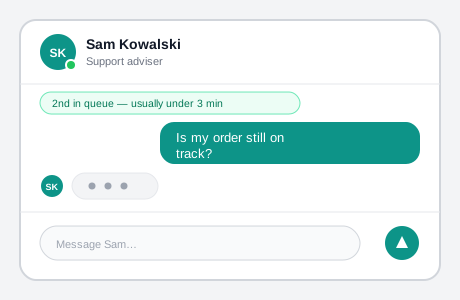 A name, a face, a presence dot, and someone visibly typing say “this is a person” — the same disclosure job an explicit “AI” label handles on its bot counterpart.
Background
Live chat (webchat) connects a person to a real human adviser through real-time text, offered as one contact channel alongside phone, email, and post rather than replacing them — the human-staffed counterpart to AI Chat Interface, with a different core problem at its center: a person often can’t tell whether a human or a bot is actually replying, and that ambiguity is itself what needs designing around, not just an accessible, well-structured chat window.
a person often can’t tell whether a human or a bot is actually replying, and that ambiguity is itself what needs designing around, not just an accessible, well-structured chat window.
Problem
Research consistently finds people default to trusting a phone call over webchat. They expect phone-call-level immediacy that an adviser handling several chats at once can’t always deliver, and they often can’t tell whether they’re talking to a human or a bot. That uncertainty makes them less willing to share personal or financial information — trust problems a well-built chat window’s structure alone doesn’t solve.
That uncertainty makes them less willing to share personal or financial information — trust problems a well-built chat window’s structure alone doesn’t solve.
Solution
Present webchat as one contact channel with its own disclosed wait
List webchat alongside phone, email, and post rather than promoting it as the default, order channels by what user research actually shows people need, and keep that order consistent everywhere in the service. State webchat’s own expected wait the same way an email channel states its response time (e.g. “Current waiting time is 17 minutes”) — this is what actually lets someone choose the channel that fits their situation, rather than defaulting to phone out of uncertainty.
Make the human on the other end legible, not just present
Since people often can’t tell if they’re talking to a human or a bot — and trust a suspected-bot reply less, especially with personal or financial information — build in concrete signals that a real person is responding: name the adviser, show a typing indicator while they compose a reply, and let advisers write in natural, conversational language rather than templated system phrasing. This is the mirror image of AI Content Marking: there the goal is marking that a reply is AI-generated; here it’s establishing that it isn’t.
Announce chat events through ARIA live regions, tuned to real assistive-technology behavior
Wrap the parts of a chat window that change without a page reload — queue position, an adviser typing, an adviser going offline, a new message arriving — in aria-live regions so a screen reader user learns about them without having to keep re-checking the page.
Test across more than one screen reader before relying on the result: VoiceOver on Safari was found to interrupt an in-progress announcement with a new one, while NVDA on Firefox/IE11 queues the new announcement until the current one finishes — the same live region can read very differently depending on which assistive technology is running it. Keep the volume of notifications restrained regardless of which behavior a given screen reader has, since even a correctly-implemented live region becomes noise once it fires too often.
The same live region can read very differently depending on which assistive technology is running it.
Label controls by what they do, not by a bare verb
Give a message-submission field a hidden label paired with a real <button> element, and write aria-labels that describe a control’s actual effect rather than a generic action word — “Minimize the webchat” over “Hide,” “Close the webchat” over “Close.” Where a message needs an attribution label, test whether a more conversational phrasing (“Tom said: How can I help”) or a flatter one works better for that specific journey — the more conversational form isn’t a universal improvement, and a chat with many back-and-forth messages can find it gets in the way.
Give sound a redundant, not sole, role
A sound cue can reinforce a queue-position change or a new message arriving, but never let it be the only signal for that change — a hard-of-hearing person should get the same information some other way, not just miss it.
Add skip links to the chat’s own key controls
Let a person jump straight to the chat window, straight to the message-submission field once they’ve finished typing, or straight to an end-chat confirmation — a chat widget is often appended late in a page’s DOM order, so without these a keyboard or screen reader user has to tab past everything else on the page first just to reach it.
Related Concepts
Patterns
Principles
Standards
Sources
GOV.UK Design System is the source for presenting webchat as one ordered, consistently-placed contact channel alongside phone/email/post, and for disclosing its expected wait time.
GOV.UK Webchat Alpha: User Research and Accessibility Patterns is the source for the human-vs-bot trust research and the adviser-humanization techniques it points to, and for the ARIA-live-region, labeling, sound, and skip-link accessibility patterns tested against real screen readers.