
- Plan
- Explore
- Concept
- Evaluate
- Launch
Card Sorting
Overview
How would customers organize this content themselves, rather than however the design team happened to structure it?
Give people the names of content items and have them group them into categories that make sense to them, then name the categories — a way of discovering a candidate Information Architecture directly from customer vocabulary rather than guessing at one. Often run alongside Affinity Diagramming on the same raw research data, but the two generate structure differently: affinity diagramming clusters the researcher’s own field notes, while card sorting has customers do the categorizing themselves.
Give people the names of content items and have them group them into categories that make sense to them, then name the categories — a way of discovering a candidate Information Architecture directly from customer vocabulary rather than guessing at one.
Run It With Multiple Participants
There is rarely one “correct” grouping — sorting a deck of cards by suit, by number, or by color are all valid, just useful for different purposes — and the same is true of content: sorting “Apples / Oranges / Bananas” comes out differently depending on whether the audience cares about local-vs-tropical sourcing, organic-vs-conventional farming, or botanical classification. Running card sorting with several people (customers or teammates) and comparing where their groupings disagree is the valuable part — disagreement flags ambiguous terminology or items that genuinely belong in more than one category. Running it remotely via Web-based tools reaches more participants at lower cost, at the price of losing the moderator’s ability to ask a participant why they grouped something a particular way.
Running card sorting with several people (customers or teammates) and comparing where their groupings disagree is the valuable part — disagreement flags ambiguous terminology or items that genuinely belong in more than one category.
The same vocabulary card sorting surfaces is also useful for anticipating likely search terms before launch — see Organized Search Results — rather than waiting to discover vocabulary mismatches through post-launch search-log analysis.
Choose Open, Closed, or Tree Testing
This basic version is open card sorting — participants invent their own category names, which is why it surfaces vocabulary as well as grouping. Its counterpart is closed card sorting, where participants sort into a fixed set of category names you supply instead of inventing their own; closed sorting doesn’t generate a new structure, it evaluates how well an existing or proposed one already matches people’s expectations — useful once you have a candidate information architecture and want to validate it rather than discover one from scratch.
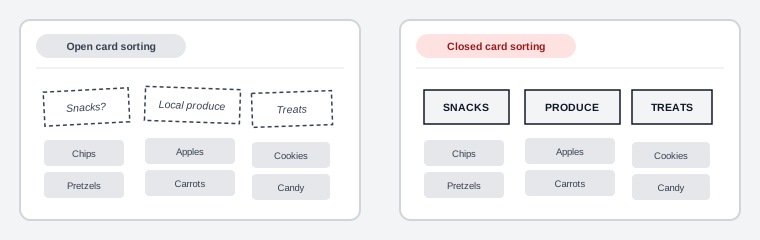 Same items, same eventual groupings — the only thing that changed is who got to name the categories.
A related but distinct check is tree testing (also called reverse card sorting): give participants a task and an existing category hierarchy, with none of a real site’s navigational aids (search, breadcrumbs), and see whether they can find the right place for it — this isolates whether the structure itself supports the task, separate from how a site’s actual UI might compensate for a weak one. For getting a usable result from fewer participants, Modified-Delphi card sorting (created by Celeste Paul) has only the first participant do a full independent sort, with each subsequent participant iterating on the previous one’s result rather than starting over, building consensus faster.
Analyze Results Semantically or Syntactically
Across all variants, the resulting sorts get analyzed in one of two ways: semantically, by comparing the category labels and descriptions participants used (e.g. grouping “Difficult to understand” and “Confusing” as the same underlying complaint even though the words differ); or syntactically, by comparing the actual groupings — how often two cards landed together across participants, summarized into a similarity structure (sometimes visualized as a dendrogram) that reveals the most consistent groupings without relying on participants’ own labels at all.
Validate a Candidate Hierarchy Afterward
Card sorting generates candidate categories and labels; two related techniques test them afterward, once a candidate hierarchy exists: category identification (give people a list of category names plus a list of tasks, and see which category they’d pick for each task) and category description (give people just a category name and ask what they think it contains). Running both with a fresh set of participants catches labels that made sense to the people who invented them but not to anyone else.
Card sorting generates candidate categories and labels; two related techniques test them afterward, once a candidate hierarchy exists.
Related Concepts
Patterns
Principles
Processes
Further reading
Nielsen Norman Group’s “Card Sorting: Uncover Users’ Mental Models” (commercially published, no stated open license) supplies the sizing numbers the taxonomy above leaves out — roughly 30–50 cards before participants tire, at least 15 participants for a qualitative read and 30–50 for a generalizable quantitative one — and argues against the hybrid sort, where participants may add to a supplied category set, since those pre-written names bias exactly the vocabulary an open sort exists to surface.
Sources
Card Sorting (Wikipedia) supplies this page’s full card-sorting taxonomy — open vs. closed sorting, tree testing (reverse card sorting), Modified-Delphi sorting, and the semantic-vs-syntactic split for analyzing results.
The Design of Sites: Pattern Group B — Creating a Navigation Framework is the source for category identification and category description, the two follow-up techniques this page describes for testing a candidate hierarchy once card sorting has generated one.