
- Plan
- Explore
- Concept
- Evaluate
- Launch
Storyboarding
Overview
How do you show a team and a client what an experience will actually feel like, before there’s any interface to click through?
A storyboard is a rough, deliberately low-fidelity sequence of sketched screens depicting how a person moves through one specific task step by step. It’s adapted from film and animation’s frame-by-frame planning technique into a fast, disposable design-communication tool, most often paired with a narrative scenario when presenting an idea to a client or stakeholder.
A storyboard is a rough, deliberately low-fidelity sequence of sketched screens depicting how a person moves through one specific task step by step.
Keep it rough on purpose
A storyboard is sketched, not polished — squiggled placeholder text and rough boxes standing in for real content and imagery — the same low-fidelity choice Rapid Prototyping recommends for early design artifacts generally, so a team isn’t tempted to treat an early idea as final and discussion stays on structure and flow rather than visual detail. During a software specification phase specifically, this rough sequence is what lets engineers and a client jointly narrow down what’s actually needed: it’s cheaper to redraw a sketch than to rebuild an implemented screen, and easier for a non-technical stakeholder to follow than an abstract written description.
During a software specification phase specifically, this rough sequence is what lets engineers and a client jointly narrow down what’s actually needed: it’s cheaper to redraw a sketch than to rebuild an implemented screen, and easier for a non-technical stakeholder to follow than an abstract written description.
Design comics
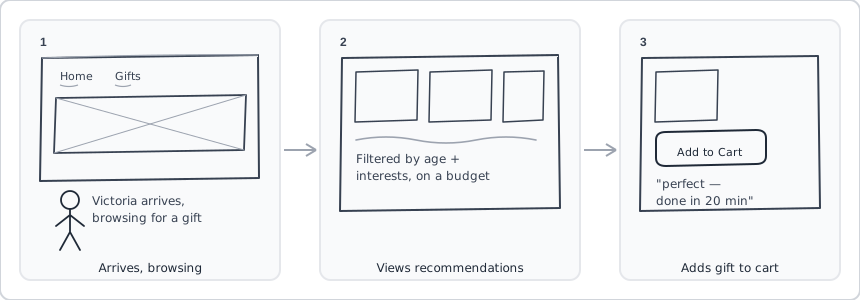 A character carries the story across all three panels — not just three screens in sequence, but “arrives, narrows down, and buys” as one continuous scene.
“Design comics” are a storyboard variant that writes a customer or other character directly into the narrative, rather than showing bare screens alone — most often used for designing websites or illustrating a product-use scenario, which is exactly the persona-plus-scenario pairing this technique is normally used with.
Where it fits in a project
A storyboard is typically seeded by synthesis work already done earlier in a project — the clustered patterns Affinity Diagramming surfaces from raw research notes, or the customer-vocabulary categories Card Sorting produces — and is used alongside personas and scenarios to sanity-check a design idea against a specific fictional customer before any interface exists. It’s one of Rapid Prototyping‘s three core early-design artifacts, alongside the site map and the schematic, moving through that page’s low-to-high-fidelity spectrum as a project progresses, and it represents the “prototype” step of Iterative Design‘s design→prototype→evaluate cycle. Across Web Site Development Process‘s Exploration, Refinement, and Production phases, storyboards reappear at increasing fidelity as client-facing deliverables — from a rough first pass to a polished, image-rich version used for final sign-off.
Related Concepts
Processes
- Personas and Scenarios
- Rapid Prototyping
- Affinity Diagramming
- Card Sorting
- Iterative Design
- Web Site Development Process
- Contextual Inquiry
Sources
The Design of Sites: Ch. 3 — Knowing Your Customers: Principles and Techniques supplies the persona-paired storyboard technique — a rough, low-fidelity page sequence showing how a specific persona carries out one task.
The Design of Sites: Ch. 4 — Involving Customers with Iterative Design supplies the storyboard’s place in the site-map/storyboard/schematic design-artifact taxonomy and the low-to-high-fidelity prototyping spectrum it moves through.
Storyboard (Wikipedia) supplies the software-specification-phase framing (engineer/client collaborative revision, cost advantage over an implemented interface) and the “design comics” variant.