
Self-Service Government
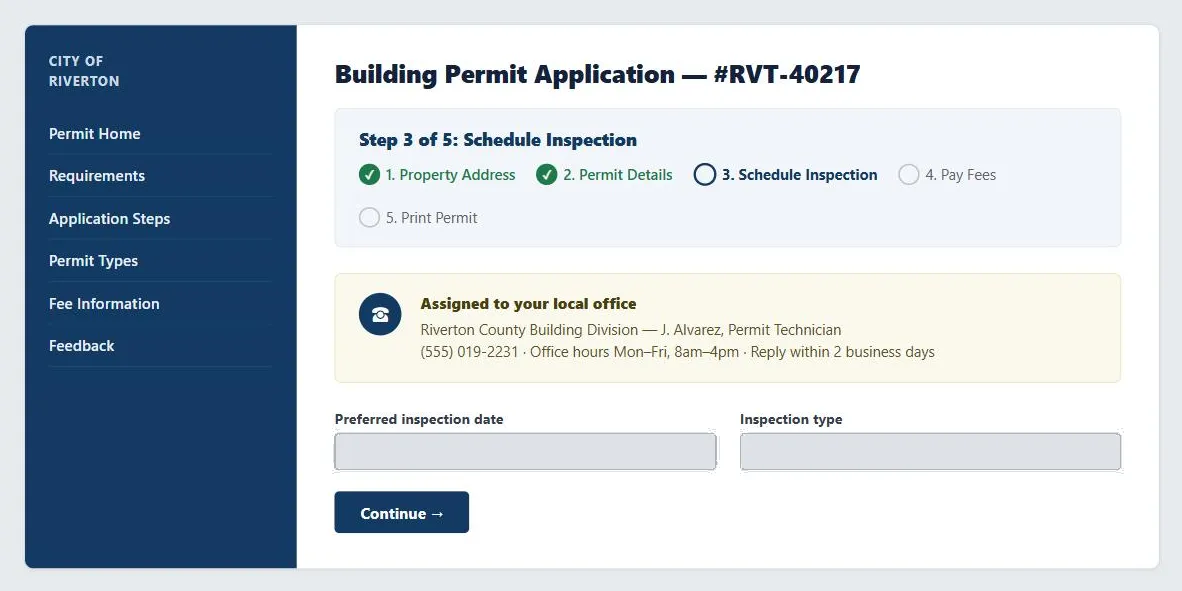 Live status (which steps are actually done) and a named local contact with a reply-time commitment are what separate a self-service application from a form that vanishes into a queue.
Problem
Citizens can’t simply take their business elsewhere the way a dissatisfied shopper switches retailers, so a bad government site doesn’t just lose a transaction — it reinforces exactly the “faceless bureaucracy” impression it’s meant to fix. Offline, this shows up as waiting in line, being bounced between departments, and submitting a form and hearing nothing back.
Citizens can’t simply take their business elsewhere the way a dissatisfied shopper switches retailers, so a bad government site doesn’t just lose a transaction — it reinforces exactly the “faceless bureaucracy” impression it’s meant to fix.
Red tape
Centralized, large agencies process requests with little visible status and no local decision-making authority, so a citizen’s problem is stuck until it works through a queue they can’t see into.
Faceless bureaucracy
Even where a government service does go online, it’s often just as impersonal as its offline counterpart: no named contact, no feedback, a form that still has to be printed and mailed once “submitted.”
Solution
Self-service government (e-government) sites replace those offline interactions with self-contained online services that report their own status. The fix for both is the same shape: small, autonomous self-service applications that show live status as a request is processed, plus a route to a specific local agent with real authority to resolve problems — not just a generic contact form.
small, autonomous self-service applications that show live status as a request is processed, plus a route to a specific local agent with real authority to resolve problems — not just a generic contact form.
Ensure universal access
A government site’s legitimacy depends on genuinely serving citizens who lack fast connections, current hardware, or comfortable general Web literacy — not just the digitally fluent. This can mean subsidizing access devices or providing them in public spaces (libraries, post offices), building pages that work over slow connections and older software, and treating Accessibility as a baseline requirement rather than an enhancement, since some citizens will specifically need it to use a mandatory government service at all.
Give privacy and trust extra weight
Government sites face a version of privacy and trust concerns that’s stricter than most commercial sites: even legitimate features can look like surveillance overreach when a government does them. Establish clear Fair Information Practices and a prominent Privacy Policy, but specifically avoid IP tracking and cookie-based persistent sessions unless a feature genuinely requires them — the same tracking a retailer uses for convenience can read, from a government site, as monitoring citizens without cause. Where personal or transactional data must be handled, use secure connections and require sign-in, and build in phishing countermeasures specifically against sites that impersonate government services — a government-branded phishing scam carries more leverage than most, since citizens are primed to comply with official-looking requests.
the same tracking a retailer uses for convenience can read, from a government site, as monitoring citizens without cause.
Personalize by role and locality
Beyond generic information, connect citizens to their actual local agency contact and to answers targeted at their community’s specific issues — via personalized content and content modules tied to a citizen’s location, plus proactive status updates through email subscriptions on pending requests rather than requiring the citizen to keep checking back.
Related Concepts
Patterns
- Privacy Policy
- Customer Sessions
- Preventing Phishing Scams
- Personalized Content
- Content Modules
- Email Communications
- Process Funnel
- Sign-In and Account Creation
Principles
Standards
Sources
The Design of Sites: Pattern Group A — Site Genres is this page’s sole source — A4 in Pattern Group A — covering the red-tape/faceless-bureaucracy problem framing, the universal-access and government-specific privacy/trust guidance, and the personalize-by-role-and-locality recommendations that make up the Solution section.