
- Plan
- Explore
- Concept
- Evaluate
- Launch
Know Your Customers
Overview
Do you actually know what your customers know, expect, and need — or just what your team assumes?
The first of two pillars of Customer-Centered Design (the second being Iterative Design, keeping customers involved iteratively). Its starting premise: you are not your customers — design teams don’t share their customers’ experience, vocabulary, or working habits, so intuition alone can’t substitute for actually understanding them.
design teams don’t share their customers’ experience, vocabulary, or working habits, so intuition alone can’t substitute for actually understanding them.
The four elements
Every design balances four competing elements, each exerting its own forces on the outcome: people, tasks, technology, and social/organizational context. None should dominate; the job is to balance them. This four-element analysis is the substance behind the customer analysis document produced in Web Site Development Process‘s Discovery phase, and the same questions get revisited when evaluating competitor sites in that phase’s research step.
People
Two layers: individual differences (demographics, vocabulary, domain expertise — a site for medical professionals can assume jargon a site for pre-med students can’t) and general human abilities (perception, memory, motor control), drawn from cognitive psychology, ergonomics, and human-computer interaction (HCI). One concrete law: Fitts’s Law — the time to move a pointer to a target depends on distance and target size — meaning small or distant links and buttons are measurably harder to click, which is why patterns favor larger, nearer calls to action. Those abilities also vary from person to person, and designing for that full range is the subject of Accessibility.
Tasks
See Task Analysis for the technique, including the case for reducing customer work by reusing a familiar metaphor without just imitating its weaknesses. There’s also a real difference between ease of learning and ease of use: not everything must be usable on first try (Douglas Engelbart: “If ease of use was the only valid criterion, people would stick to tricycles and never try bicycles”). But customers have little patience for training on a Web site specifically, compared to desktop software they’ve already paid for and installed — futurist Paul Saffo describes a “threshold of indignation,” the point past which people simply abandon a tool that asks too much of them for too little payoff.
Technology
Capabilities and limits of what customers actually have (browsers, plug-ins, connection speed, screen size). Two failure modes: ignoring technology entirely (sites that silently fail for anyone without the latest plug-in) and over-indexing on a favored technology (“technology for technology’s sake,” prioritizing a tool over customer needs). A concrete constraint: response times around 100ms are needed for direct-manipulation actions (dragging, typing), and around 1 second to preserve an uninterrupted flow of thought for routine actions like clicking a button — real but not absolute constraints, since network conditions vary too much to guarantee sub-second responses everywhere.
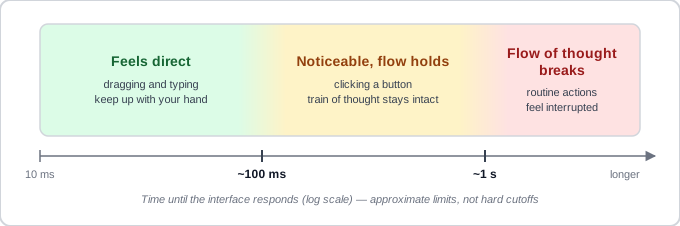 Each limit is ten times the one before it, so a delay that’s fine for a button click is already ten times too slow for dragging.
Rule of thumb: people and tasks first, technology second.
Social/organizational issues
How a Web site fits into existing organizational culture and workflow, not just individual behavior. Leysia Palen’s 1999 study of group calendaring software at two large tech companies found that default settings mattered more than configurability: over 80% of users kept whatever default was set, and the “right” default (e.g., whether a shared calendar shows full event detail or just “busy”) differed sharply between the two organizations’ cultures around privacy and control. The lesson generalizes: adding a customization option doesn’t solve a bad default, because most people never change it. It’s also worth distinguishing the customer’s organizational goals from the client’s — they can diverge, and reconciling that early avoids late-stage conflict.
adding a customization option doesn’t solve a bad default, because most people never change it.
Watch for this bias: customers who don’t return
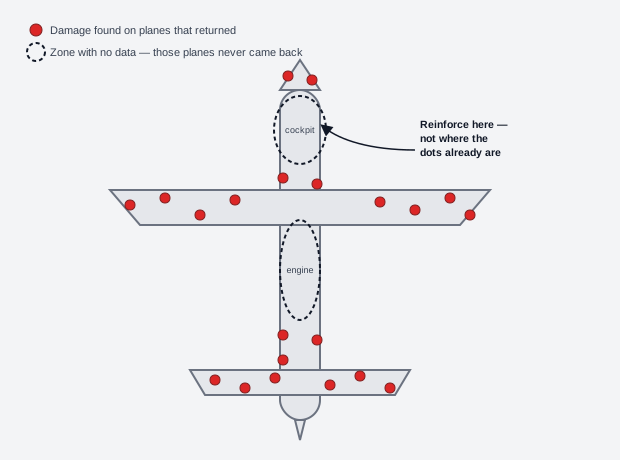 An empty zone here doesn’t mean nothing happened there — it means whatever happened there never made it back to be counted.
Borrowed from a WWII anecdote about reinforcing aircraft armor: researchers nearly recommended adding armor wherever returning planes showed bullet damage, until someone pointed out they should study the planes that didn’t return — the ones hit in the locations that actually mattered. Applied to Web analytics: studying only customers who keep coming back overlooks the people who hit a barrier and left for good, who are arguably more informative about what’s broken.
studying only customers who keep coming back overlooks the people who hit a barrier and left for good, who are arguably more informative about what’s broken.
Related Concepts
Principles
Processes
- Customer-Centered Design
- Task Analysis
- Personas and Scenarios
- Customer Research Methods
- Iterative Design
- Web Site Development Process
- Participatory Design
Sources
The Design of Sites: Ch. 3 — Knowing Your Customers: Principles and Techniques (Chapter 3) is this page’s sole source — the four-element people/tasks/technology/social-organizational framework, the Fitts’s-Law and response-time constraints, Leysia Palen’s calendaring-defaults study, and the WWII survivor-bias anecdote applied to Web analytics.