
Keyboard Shortcuts
A keyboard shortcut (also called a hotkey or key binding) assigns an action to one or more keys, so an experienced customer can invoke a command in a few keystrokes instead of navigating a menu or reaching for a pointing device. That’s the concrete mechanism behind Interface Design Principles‘s “accelerators for frequent customers” principle and Nielsen’s matching “flexibility and efficiency of use” heuristic (see Heuristic Evaluation).
A keyboard shortcut (also called a hotkey or key binding) assigns an action to one or more keys, so an experienced customer can invoke a command in a few keystrokes instead of navigating a menu or reaching for a pointing device.
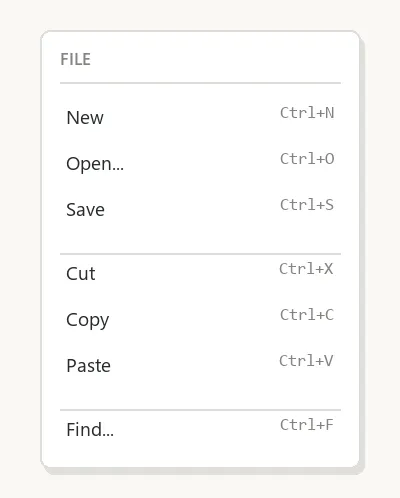 The shortcut is printed right where the action lives — a customer picks it up just by using the menu the slow way once.
Simultaneous vs. sequential shortcuts
Most shortcuts require several keys pressed together (a modifier held down, then the regular key pressed and released, then the modifier released) — pressing every key at once instead frequently drops a modifier or triggers unwanted auto-repeat. A held modifier key is itself a quasimode: it changes what the next key does only for as long as it’s physically held, so nothing about it needs to be remembered. Sequential shortcuts instead require keys pressed and released one after another, usually starting with a dedicated prefix key (the Esc key is a common example); Emacs’s own shortcut vocabulary is built almost entirely on this model, chaining prefix keys like Ctrl+X into multi-step sequences such as Ctrl+X Ctrl+S to save a file.
Standardizing shortcuts protects customers, not just convenience
The early Macintosh interface guidelines set a stricter rule than just “pick sensible shortcuts”: if an application didn’t implement the function a standard keystroke normally performed, the guidelines said not to redefine that key for something else — reusing a customer’s already-learned shortcut for a different action would confuse them precisely because it violates an expectation the platform itself trained. Later platforms (Windows, and macOS’s own later evolution) never enforced this as strictly across every application, which is part of why shortcut behavior feels more consistent within the Mac ecosystem’s oldest conventions (Cmd+Z Undo, Cmd+X/C/V for cut/copy/paste) than it does cross-platform generally.
If an application didn’t implement the function a standard keystroke normally performed, the guidelines said not to redefine that key for something else — reusing a customer’s already-learned shortcut for a different action would confuse them precisely because it violates an expectation the platform itself trained.
Notation isn’t universal either
A single-key shortcut is usually just written as the key’s name (“Press F1 for Help”); multi-key shortcuts are conventionally chained with a plus sign or hyphen (“Ctrl+C”, “Ctrl-C”), though Unix-derived notation sometimes writes the modifier as a caret (^C) and treats the case of the second character as meaningful (^C vs. ^c only differ if Shift is genuinely part of the combination). None of this is standardized across platforms or documentation styles, so a shortcut reference has to establish its own notation rather than assuming customers already share one.
None of this is standardized across platforms or documentation styles, so a shortcut reference has to establish its own notation rather than assuming customers already share one.
Single-character shortcuts carry their own accessibility risk
A shortcut bound to one unmodified character key — pressing “S” alone to save, say — is easy to trigger by accident: a stray keystroke, a misclick, or a false positive from speech-to-text software can fire the action when the customer never intended it, since dictation software listening for spoken words has no way to distinguish a word that happens to match a shortcut key from a deliberate command. A shortcut requiring two or more keys held together is far less likely to fire unintentionally through any of these paths. Where a single-character shortcut already exists, either remap it to a multi-key combination or make it possible to turn off entirely if it doesn’t carry enough value to justify the risk.
A shortcut bound to one unmodified character key is easy to trigger by accident: a stray keystroke, a misclick, or a false positive from speech-to-text software can fire the action when the customer never intended it.
Related Concepts
Patterns
Principles
Processes
Further reading
Nielsen Norman Group’s “Accelerators Maximize Efficiency in User Interfaces” (commercially published, no stated open license) treats keyboard shortcuts as one kind of accelerator, and recommends revealing them to customers gradually rather than all at once.
Nielsen Norman Group’s “UI Copy: UX Guidelines for Command Names and Keyboard Shortcuts” (commercially published, no stated open license) separates access keys from command shortcuts and sets wording conventions for displaying each, a practical follow-on to Notation isn’t universal either.
Sources
Keyboard Shortcut (Wikipedia) (Wikipedia) is this page’s original source — the simultaneous-vs-sequential shortcut distinction, the early Macintosh guidelines’ rule against redefining a standard shortcut’s key, and the inconsistent cross-platform notation conventions.
Keyboard Accessibility (Home Office Design System) (OGL v3.0) is the source for the single-character-shortcut accessibility risk above.