
Site Footer
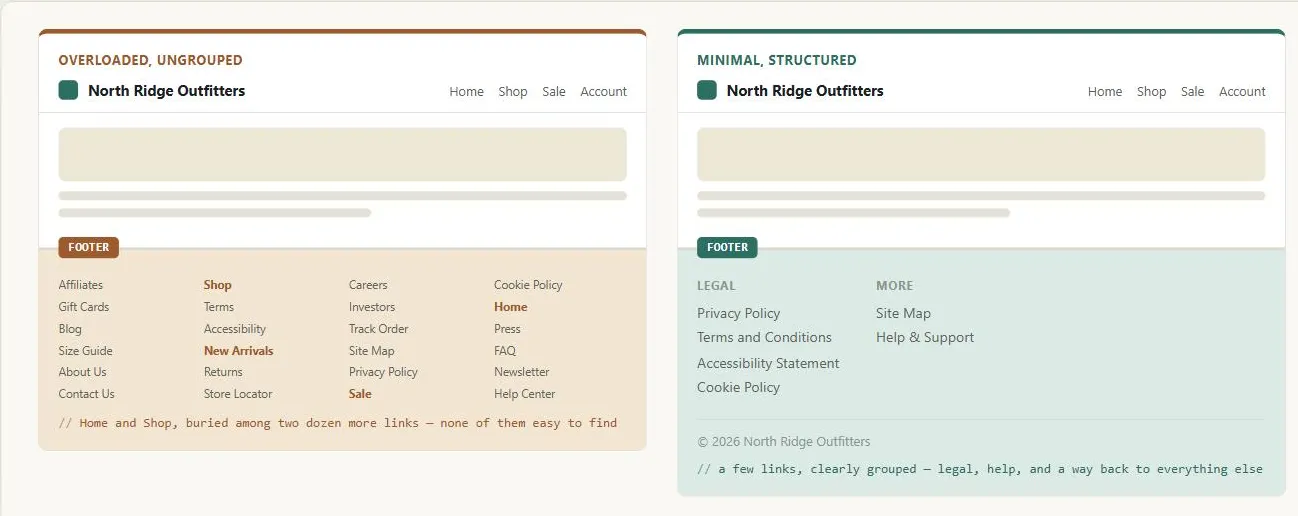 The essentials — legal pages, help, a site map — are in both footers, but only the right one lets a visitor find them without scanning two dozen other links.
Background
The footer is the persistent structural region that closes every page’s content, paired with Site Header at the top. It provides secondary utility and institutional context and — together with the header — is among the strongest consistency signals a site can offer: users rely on finding it in the same position with the same content on every page.
It provides secondary utility and institutional context and — together with the header — is among the strongest consistency signals a site can offer: users rely on finding it in the same position with the same content on every page.
Problem
A footer that buries primary navigation or grows unwieldy with dozens of links loses the utility of the links that actually matter.
A footer that buries primary navigation or grows unwieldy with dozens of links loses the utility of the links that actually matter.
Solution
Give the footer a consistent structure — legal/policy links, a copyright notice, optional secondary navigation, help links — keep it positioned consistently on every page, and build it with accessible landmark structure.
Link to legal and policy pages
Privacy policy, Terms and conditions, Accessibility statement, Cookie policy. These are rarely navigated but must be discoverable — the footer is where users look for them. Consistent footer placement means the user knows where to look regardless of which page they arrived on.
Show a copyright and licensing notice
Clarifies ownership and reuse rights. For public-sector sites, an explicit open license (e.g. Open Government Licence) may apply; for commercial sites, a standard copyright notice suffices.
Add secondary navigation
Optional: links to key sections, contact information, or department/team pages — commonly including a link to the site’s site map, the standard place for that last-resort listing to live so it’s reachable from every page without costing space above the fold. Useful on large sites where the footer is a last-resort navigation fallback. For linear transactional flows (checkout, application forms), secondary navigation in the footer is a distraction — users mid-task should not be tempted to navigate away.
Provide help and support links
Contact, help center, or feedback form — commonly a link to a FAQ page. These serve users who failed their primary task and need a human path out.
Keep a consistent position
Bottom, every page, no exceptions. Users who encounter a page that breaks this pattern experience a mild disorientation that erodes confidence in the site.
Users who encounter a page that breaks this pattern experience a mild disorientation that erodes confidence in the site.
Keep a minimal footprint
Limit the footer to the groups above rather than letting it collect every link that lacks a home elsewhere on the site.
Don’t hide primary navigation in the footer
Footer navigation is supplementary. If users are finding primary navigation only in the footer, the primary header navigation placement has failed. Repeating the header’s primary navigation in the footer doesn’t help either: it adds no new way in, only more links competing with the ones the footer is there for.
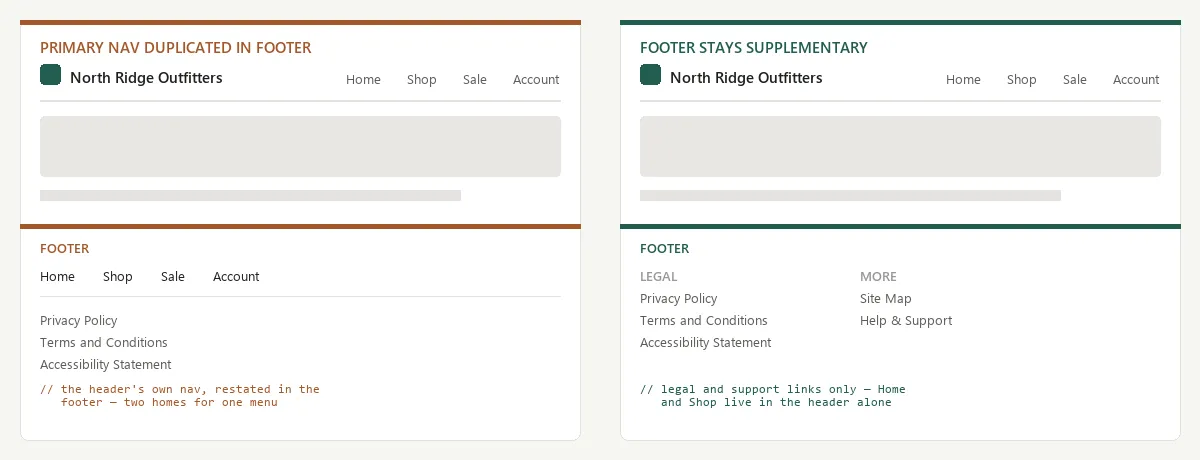 Every link in the left footer’s top row is already one click away in the header; the right footer spends that space on links the header doesn’t have.
Use an accessible structure
The footer must be wrapped in a <footer> landmark element, so screen reader users can navigate directly to it. See Accessibility.
<footer>
<nav aria-label="Footer">
<ul>
<li><a href="/privacy">Privacy Policy</a></li>
<li><a href="/terms">Terms and Conditions</a></li>
<li><a href="/accessibility">Accessibility Statement</a></li>
<li><a href="/sitemap">Site Map</a></li>
</ul>
</nav>
<p>© 2026 North Ridge Outfitters</p>
</footer>Related Concepts
Patterns
- Site Header
- Page Template
- Site Map (Navigation Page)
- Above the Fold
- Privacy Policy
- Frequently Asked Questions
Principles
Sources
GOV.UK Design System (Open Government Licence v3.0) is this page’s sole source — its footer component guidance on legal/policy links, copyright and licensing notices, when secondary navigation belongs in the footer (and when it’s a distraction, as in linear transactional flows), and the <footer> landmark-element requirement.